NixOS Dotfiles (v5)


A declarative, multi-host NixOS configuration built with Nix Flakes, flake-parts, and Home Manager. This setup features an automated discovery system that dynamically generates host configurations and modules.
🚀 Quick Start
Installation
-
Boot the Installer: Use the custom ISO provided by this flake:
nix build .#installer-iso -
Partition & Install:
# Using Disko (automated) just install <hostname> -
Manual Install:
# Clone the repo
git clone https://github.com/xiro-codes/dotfiles.v5.nix /etc/nixos
cd /etc/nixos

# Generate hardware config
nixos-generate-config --show-hardware-config > systems/<hostname>/hardware.nix

# Install
nixos-install --flake .#<hostname>
Architecture: Automated Discovery
This repository utilizes a modular discovery engine (parts/discovery/) that scans the file system to build the flake. This eliminates the need to manually register new files in flake.nix.
- Systems: Every directory in /systems is automatically converted into a nixosConfiguration.
- System Modules: Found in /modules/system. Any directory with a default.nix is automatically exported as a NixOS module.
- Home Modules: Found in /modules/home. These are automatically exported for use within Home Manager.
- Home Configurations: Standalone Home Manager configurations are generated from user@hostname.nix files in /home.
- Packages: Custom packages in /packages are automatically built for the current system.
- Dev Shells: Every directory in /shells is automatically exported as a devShell (accessible via
nix develop .#<name>). - Deploy Nodes: Systems with a deploy.nix file are automatically added to deploy-rs configuration.
- Templates: Project templates in /templates are automatically exported.
💻 Managed Systems
Onix
- Role: Home Server
- IP: 10.0.0.65
- Bootloader: UEFI with systemd-boot
- Key Features: Central file server, Gitea instance, media server, and Pi-hole.
- Hosted Domains:
dashboard.onix.home,git.onix.home,tv.onix.home,plex.onix.home,ch7.onix.home,comics.onix.home,audiobooks.onix.home,dl.onix.home,yt.onix.home,pihole.onix.home,docs.onix.home,cache.onix.home
Ruby
- Role: Primary Workstation
- IP: 10.0.0.66
- Bootloader: UEFI with Limine
- Key Features: High-performance workstation, local backup management, and comprehensive network share mounts (Music, Books, Backups).
Sapphire
- Role: AI Services & Secondary Workstation
- IP: 10.0.0.67
- Bootloader: UEFI with Limine
- Key Features: Local LLM and AI services (Ollama, Open WebUI), remote mounts.
- Hosted Domains:
ui.sapphire.home,ai.sapphire.home
🛠️ Key Modules & Features
- Backup Manager: Automated borg-based backups to /mnt/zima/Backups with smart exclusions for development artifacts (node_modules, target, .direnv).
- Secrets Management: Integrated via sops-nix. Handles sensitive data like SSH keys and API tokens (e.g., Gemini API keys).
- Desktop Environment: Both systems default to Hyprland with automated theming via Stylix.
- User Manager: Simplifies user creation and shell (Fish) configuration.
- Share Manager: Centralized logic for mounting network storage across nodes.
⌨️ Command Reference (just)
The justfile provides several helpers for system administration:
| Command | Action |
|---|---|
| just | List all available commands |
Life (Local System Management)
| Command | Action |
|---|---|
| just switch | Switch local system configuration using nh |
| just boot | Set next boot generation using nh |
| just rebuild | Standard nixos-rebuild switch (impure) |
Deploy (Remote Management)
| Command | Action |
|---|---|
| just deploy <host> | Deploy to a remote node using deploy-rs |
| just deploy-all | Deploy all nodes in the flake |
| just check | Safety check before deploying (eval and dry-run) |
| just gc <host> | Garbage collect a remote node to free space |
Secrets
| Command | Action |
|---|---|
| just edit-secrets | Edit encrypted SOPS secrets |
| just update-keys | Update system keys |
Backups
| Command | Action |
|---|---|
| just init-backup | Initialize borg backup repository |
| just run-backup | Run borg backup manually |
| just mount-backup <host> | Mount backup archive to /.recovery |
| just umount-backup | Unmount backup archive |
| just check-timer | Check when next backup is scheduled |
| just list-backups | Show all current backups |
Install
| Command | Action |
|---|---|
| just install <host> | Install a system from scratch using disko |
| just rescue | Quick fix for a borked system (assumes std labels) |
| just bake-recovery | Burn a new ISO to the recovery partition |
Dev
| Command | Action |
|---|---|
| just run-test | Build and launch the custom Installer ISO in QEMU |
| just clean-test | Clear the test environment |
| just init-undo | Initialize local .undo_dir for Nixvim persistent undo |
| just clear-undos | Clear ephemeral undo directory for current repo |
Docs
| Command | Action |
|---|---|
| just gen-docs | Generate module documentation to docs/ |
| just serve-docs | Serve docs locally and open in browser |
| just build-docs | Build the static documentation site |
| just view-docs | View docs in terminal |
📚 Module Documentation
All custom modules are documented with auto-generated option references:
- Module Reference - Complete documentation of all custom options
- System Modules - NixOS system module options
- Home Modules - Home Manager module options
To regenerate documentation: just gen-docs
💿 Custom Installer
This flake includes a specialized installer ISO (#installer-iso) for deploying new nodes.
- How to use: Boot the ISO and manually partition the target disk, then use
just install <host>to deploy the configuration. - Features: Includes necessary tools for manual system installation and disko-based automated partitioning.
📁 Repository Structure
home/               # User-specific Home Manager configurations
modules/
    home/           # Reusable Home Manager modules
    system/         # Reusable NixOS modules
packages/           # Custom Nix packages
parts/              # Flake logic (Discovery engine, docs, shells)
secrets/            # SOPS-encrypted secrets
shells/             # Development shells (auto-discovered)
systems/            # Host-specific configurations (Ruby, Sapphire)
templates/          # Scaffolding for new modules and projects
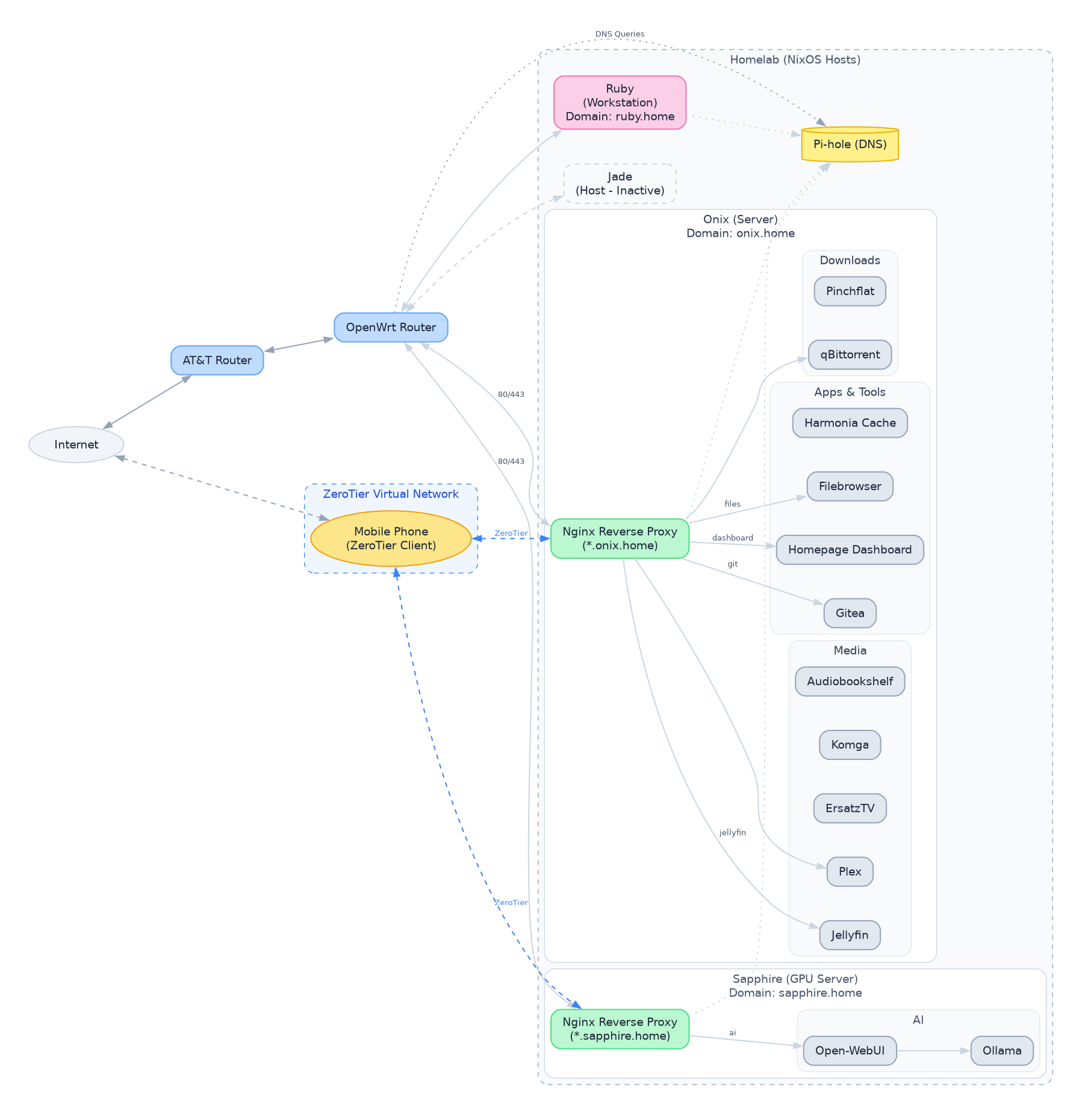
Network Architecture
Here is the current network architecture for the homelab and services.
bluetooth
This module enables and configures a modern Bluetooth stack for NixOS. It sets up the necessary hardware configurations, automatically powers on Bluetooth at boot, and applies various settings to enhance the Bluetooth experience. It also integrates with audio and desktop environment settings to provide a seamless user experience. Specifically, when audio is enabled through the local.audio.enable option, it configures WirePlumber to utilize high-quality Bluetooth codecs. If Plasma is not the selected desktop, it also enables Blueman.
Options
This module provides the following options:
local.bluetooth.enable
Type: boolean
Default value: false
Description: Enables the modern Bluetooth stack. Setting this to true activates the configurations defined within the module, enabling Bluetooth functionality and applying the specified settings.
Configuration Details
When local.bluetooth.enable is set to true, the following configurations are applied:
-
Hardware Configuration:
hardware.bluetooth.enableis set totrue, enabling the Bluetooth hardware.hardware.bluetooth.powerOnBootis set totrue, ensuring Bluetooth is automatically powered on during system startup.hardware.bluetooth.settings.Generalis configured with the following options:Experimental = true: Enables experimental Bluetooth features.FastConnectable = true: Allows for faster connection establishment with paired devices.JustWorksRepairing = "always": Configures automatic pairing repair when using the "Just Works" pairing method.Privacy = "device": Sets the Bluetooth privacy mode to "device", which may prevent the device from being discoverable by default.ControllerMode = "dual": Sets the Bluetooth controller mode to "dual", allowing for simultaneous BR/EDR and LE connections.
-
Blueman Integration:
- If Plasma 6 is not enabled via
config.services.desktopManager.plasma6.enable,services.blueman.enableis set totrue. Blueman provides a graphical interface for managing Bluetooth devices.
- If Plasma 6 is not enabled via
-
Audio Integration (with PipeWire/WirePlumber):
- If
config.local.audio.enableistrue(audio is enabled elsewhere in the system configuration), the following WirePlumber settings are applied:services.pipewire.wireplumber.extraConfig."monitor.bluez.properties"is configured to:"bluez5.enable-sbc-xq" = true: Enables the SBC XQ Bluetooth audio codec for improved audio quality."bluez5.enable-msbc" = true: Enables the mSBC Bluetooth audio codec."bluez5.enable-hw-volume" = true: Enables hardware volume control via Bluetooth."bluez5.roles" = [ "a2dp_sink" "a2dp_source" "bap_sink" "bap_source" "hsp_hs" "hfp_ag" ]: Configures the supported Bluetooth roles for audio devices, covering a wide range of use cases.a2dp_sink: Allows the device to receive high-quality audio (e.g., headphones).a2dp_source: Allows the device to transmit high-quality audio (e.g., streaming music).bap_sink: Allows the device to receive broadcast audio (e.g., hearing aids).bap_source: Allows the device to transmit broadcast audio (e.g., assistive listening devices).hsp_hs: Headset Profile (e.g., simple headsets).hfp_ag: Hands-Free Profile (e.g., car kits).
- If
This configuration ensures that the Bluetooth stack is properly initialized, audio quality is maximized (when audio is enabled), and a user-friendly interface is available for managing Bluetooth devices.
bootloader
This module configures the bootloader for a NixOS system. It supports both UEFI and legacy BIOS boot modes, and offers different bootloader options for UEFI, including systemd-boot, GRUB, and Limine. It also provides options for adding a recovery partition boot option and enabling Plymouth boot splash screen.
Options
Here's a detailed breakdown of the available configuration options:
local.bootloader.mode
-
Type:
enumof["uefi", "bios"] -
Default:
"uefi" -
Description: Specifies the boot mode to use.
uefi: Configures the system to boot using UEFI (Unified Extensible Firmware Interface). This is the modern standard and generally recommended for newer hardware.bios: Configures the system to boot using legacy BIOS (Basic Input/Output System). This is necessary for older hardware that does not support UEFI.
local.bootloader.uefiType
-
Type:
enumof["systemd-boot", "grub", "limine"] -
Default:
"systemd-boot" -
Description: Selects the UEFI bootloader to use when
modeis set to"uefi".systemd-boot: Uses systemd-boot, a simple and lightweight UEFI bootloader integrated with systemd. It is generally easy to configure and works well with NixOS.grub: Uses GRUB (GRand Unified Bootloader), a powerful and versatile bootloader with a wide range of features. It can be more complex to configure than systemd-boot but provides greater flexibility.limine: Uses Limine, a modern, advanced, and blazingly fast bootloader. It offers some unique features and is designed to be extensible.
local.bootloader.device
- Type:
string - Default:
"" - Example:
"/dev/sda" - Description: Specifies the device where the BIOS bootloader should be installed. This option is only relevant when
modeis set to"bios". It should point to the hard drive (e.g.,/dev/sda) and not a specific partition. Uselsblkorfdisk -lto identify the correct device. Important: Installing to the wrong device can render your system unbootable.
local.bootloader.addRecoveryOption
- Type:
boolean - Default:
false - Description: Determines whether to add a boot entry for a recovery partition to the bootloader menu. When set to
true, a special boot option will appear, allowing you to boot into a recovery environment. This is useful for troubleshooting and system maintenance. Requireslocal.bootloader.recoveryUUIDto also be set.
local.bootloader.recoveryUUID
-
Type:
string -
Default:
"" -
Example:
"12345678-1234-1234-1234-123456789abc" -
Description: Specifies the UUID (Universally Unique Identifier) of the recovery partition. This UUID is used to identify the correct partition to boot from when the recovery option is selected. You can obtain the UUID of your recovery partition using the
blkidcommand. This option is only relevant whenlocal.bootloader.addRecoveryOptionis set totrue.- To find the UUID of a partition, run
sudo blkid /dev/sdXN, replacing/dev/sdXNwith the device name of your partition (e.g./dev/sda2).
- To find the UUID of a partition, run
local.bootloader.enablePlymouth
- Type:
boolean - Default:
true - Description: Enables or disables the Plymouth boot splash screen. Plymouth provides a graphical boot experience, hiding the boot messages and displaying a visually appealing animation or image while the system is starting up. Disabling Plymouth can reveal underlying boot processes which might be helpful for debugging.
Desktops
This Nix module provides a convenient way to enable and configure various desktop environments and related settings within your NixOS system. It includes options for enabling core desktop requirements, setting up Wayland environment variables, choosing a display manager, and enabling support for specific compositors like Hyprland and Niri, as well as the KDE Plasma 6 desktop environment.
Options
Here's a detailed breakdown of the available options within the local.desktops scope:
local.desktops.enable
- Type:
boolean - Default:
false - Description:
Enables the core desktop environment support. This is the primary switch that activates the module's functionality, including setting up essential system packages and potentially configuring a display manager. If this option is set to
true, the module proceeds to configure other options, like the display manager, environment variables, and specific desktop environments. Iffalse, most of the module's configuration is skipped. It is the foundational setting upon which all others depend.
local.desktops.enableEnv
- Type:
boolean - Default:
true - Description:
Enables the setting of Wayland-specific environment variables. These variables are crucial for applications to function correctly within a Wayland environment. These variables configure application backends and display configurations to integrate smoothly with the Wayland display server. Disabling this might lead to compatibility issues with Wayland-native applications. When enabled, the module sets variables like
NIXOS_OZONE_WL,CLUTTER_BACKEND,GDK_BACKEND,MOZ_ENABLE_WAYLANDand others.
local.desktops.displayManager
-
Type:
enum [ "sddm" "gdm" "ly" "none" "dms" ] -
Default:
"dms" -
Description: Specifies the display manager to use. The display manager handles the login process and starts the desktop environment.
"sddm": Enables the Simple Desktop Display Manager (SDDM), a modern and highly customizable display manager. Enables Wayland support for SDDM."gdm": Enables the GNOME Display Manager (GDM), the default display manager for GNOME-based systems."ly": Enables Ly, a lightweight TTY-based display manager."none": Disables any display manager. This is useful for headless systems or when managing display management through other means, such as a custom script."dms": Enablesdms-greeterdisplay manager, configured to use Hyprland as the compositor. This is typically used in conjunction with enabling Hyprland in the module.
local.desktops.hyprland
- Type:
boolean - Default:
false - Description: Enables the Hyprland compositor. Hyprland is a dynamic tiling Wayland compositor based on wlroots, known for its customization options. This option ensures Hyprland is installed and configured to run. Uses a flake input to find the package.
local.desktops.niri
- Type:
boolean - Default:
false - Description: Enables the Niri compositor. This option installs and configures the Niri compositor, providing an alternative desktop environment.
local.desktops.plasma6
- Type:
boolean - Default:
false - Description: Enables the KDE Plasma 6 desktop environment. This option configures Plasma 6 as the active desktop environment, ensuring all necessary packages are installed and configured.
disks
This Nix module provides a convenient way to enable basic disk management services on your system. It configures gvfs, udisks2, and devmon to allow for easy mounting and management of removable media and other disks. This is useful for desktop environments where you want automatic mounting and unmounting of USB drives, external hard drives, and other storage devices.
Options
This module exposes a single option to control its behavior:
local.disks.enable
Type: boolean
Default: false
Description:
Enables the basic configuration for disk management. When set to true, this option activates the following services:
-
gvfs: The GNOME Virtual File System, which provides a userspace virtual filesystem on top of FUSE. It's widely used by GNOME and other desktop environments for transparently accessing remote filesystems (like SFTP, WebDAV, etc.) and removable media. Enablinggvfsgenerally makes accessing these resources much easier through your file manager (e.g., Nautilus). Crucially, it also provides the backends to mount disks managed byudisks2. -
udisks2: A system service that manages disk devices. It provides an API for applications to query and manipulate disks, partitions, and filesystems.udisks2is responsible for tasks such as mounting and unmounting removable media, formatting disks, and partitioning drives. It runs as a system service, providing a central point of control for disk management. -
devmon: A daemon that automatically mounts and unmounts removable devices when they are inserted or removed. This provides a user-friendly experience by eliminating the need to manually mount and unmount devices through the command line or a file manager. It utilizesudisks2internally and provides a more automatic experience, particularly for desktop environments.
Example Usage:
To enable the disk management module, add the following to your configuration.nix:
{
  imports = [
    ./modules/disks.nix  # Assuming this module is located in ./modules/disks.nix
  ];

  local.disks.enable = true;
}
This configuration will enable gvfs, udisks2, and devmon, providing automatic disk mounting and management capabilities.
flatpak
This module provides a convenient way to enable and configure Flatpak support on your NixOS system. It simplifies the installation of Flatpak itself, configures automatic updates, adds the Flathub repository, and allows you to specify a list of Flatpak packages to be installed system-wide.
Options
This module exposes the following options under the local.flatpak namespace:
local.flatpak.enable
-
Type:
types.bool(boolean) -
Default:
false -
Description: Enables or disables Flatpak support. When enabled, the module configures Flatpak services and installs specified packages.
Example:
To enable flatpak set this option to true
local.flatpak.enable = true;
local.flatpak.extraPackages
-
Type:
types.listOf types.str(list of strings) -
Default:
[](empty list) -
Description: A list of Flatpak package names to install system-wide in addition to the default
io.github.kolunmi.Bazaarapplication. Each element of the list should be a string representing the full Flatpak application ID (e.g.,org.mozilla.firefox).Example:
To install Firefox and LibreOffice as Flatpaks, configure the option as follows:
local.flatpak.enable = true;
local.flatpak.extraPackages = [
  "org.mozilla.firefox"
  "org.libreoffice.LibreOffice"
];
Configuration Details
When local.flatpak.enable is set to true, the following configurations are applied:
services.flatpak.enable = true;: Enables the Flatpak system service, making Flatpak available on your system.services.flatpak.update.onActivation = true;: Configures Flatpak to automatically update its packages whenever the NixOS configuration is activated (e.g., after runningnixos-rebuild switch). This ensures that your Flatpak applications are always up-to-date.services.flatpak.remotes = [{ name = "flathub"; location = "https://flathub.org/repo/flathub.flatpakrepo"; }];: Adds the Flathub repository, the most common and comprehensive Flatpak repository, to your Flatpak configuration. This allows you to easily install applications available on Flathub. Thename"flathub" is used as the alias and thelocationspecifies the URL of the repository configuration file.services.flatpak.packages = [ "io.github.kolunmi.Bazaar" ] ++ cfg.extraPackages;: Specifies the list of Flatpak packages to be installed system-wide. It automatically includes theio.github.kolunmi.Bazaarapplication and concatenates it with the list provided via thelocal.flatpak.extraPackagesoption. This ensures that all listed applications are installed whenever the NixOS configuration is applied.
Usage Example
To enable Flatpak, add the Flathub repository, configure automatic updates, and install Firefox and Bazaar, use the following configuration in your configuration.nix:
{
  imports = [
    ./path/to/this/module.nix  # Replace with the actual path to this module
  ];

  local.flatpak.enable = true;
  local.flatpak.extraPackages = [
    "org.mozilla.firefox"
  ];
}
After adding this configuration, run sudo nixos-rebuild switch to apply the changes. Flatpak will be enabled, Flathub added as a remote, and both Bazaar and Firefox will be installed as Flatpak applications. Subsequent rebuilds will ensure the apps are up to date.
Localization Module
This Nix module provides a convenient way to configure system-wide localization settings, including the timezone and locale. It aims to simplify the management of internationalization and localization parameters within your NixOS configuration. By enabling this module, you can easily set the default system locale and timezone, ensuring that your system displays information in the correct format for your region and language.
Options
This module exposes the following options under the local.localization namespace:
local.localization.enable
- Type: Boolean
- Default:
false(Disabled) - Description: Enables or disables the localization module. When enabled, the module will configure the system timezone and locale based on the settings provided. Setting this to
trueactivates the module and applies the specified localization settings.
local.localization.timeZone
- Type: String
- Default:
"America/Chicago" - Example:
"Europe/London" - Description: Specifies the system timezone. This setting controls how the system interprets and displays dates and times. It's crucial to set this correctly to ensure accurate timekeeping and scheduling. You can use the
timedatectl list-timezonescommand to see a list of available timezones on your system. Make sure to select a valid timezone from the list.
local.localization.locale
- Type: String
- Default:
"en_US.UTF-8" - Example:
"en_GB.UTF-8" - Description: Defines the default system locale. The locale setting influences how language, formatting (e.g., date, time, currency), and character encoding are handled system-wide. It determines the language used in system messages, the format of numbers and dates, and the character encoding used for displaying text. Common locales include
"en_US.UTF-8"(US English),"en_GB.UTF-8"(British English), and"de_DE.UTF-8"(German). Choosing the correct locale ensures a consistent and appropriate user experience. Setting this option also configuresi18n.extraLocaleSettingsfor comprehensive localization.
network
This module configures standard system networking, providing options to choose between NetworkManager (for desktop environments) or a minimal setup with iwd/systemd. It sets up wireless networking using iwd, configures DNS servers, and enables basic Ethernet support via DHCP. It also includes options to enable or disable NetworkManager, Avahi, and systemd-resolved.
Options
local.network.enable
Type: boolean
Default: false
Description: Enables the standard system networking configuration provided by this module. When set to true, the module will configure iwd, DNS servers, DHCP, and optionally NetworkManager and Avahi. Setting this to true activates all the features detailed below. This is the master switch for this entire module. If this is false, none of the other options have any effect.
local.network.useNetworkManager
Type: boolean
Default: true
Description: Determines whether to use NetworkManager for managing network connections (typically used on desktop environments). If set to true, NetworkManager will be enabled, and configured to use iwd as its Wi-Fi backend. If set to false, a minimal network configuration using iwd and systemd will be used, omitting NetworkManager entirely. Disabling NetworkManager can be useful for server environments or systems where a lightweight network setup is preferred.
Detailed Configuration
When local.network.enable is set to true, the following configurations are applied:
-
Networking:
-
networking.wireless.enable = false;: Disables the olderwpa_supplicant. This is done because iwd is used instead. -
networking.nameservers = [ "10.0.0.65" "8.8.8.8" ];: Sets the DNS nameservers. The module defaults to10.0.0.65and Google's public DNS (8.8.8.8). You should customize this to your local network's DNS server, or other public DNS servers. -
iwd:
networking.wireless.iwd.enable = true;: Enables iwd (iNet Wireless Daemon) for managing wireless connections. iwd is generally considered faster and more modern thanwpa_supplicant.networking.wireless.iwd.settings:Settings.AutoConnect = true;: Configures iwd to automatically connect to known Wi-Fi networks. This provides a seamless connection experience.Network.EnableIPv6 = true;: Enables IPv6 support within iwd. If your network supports IPv6, this allows your system to utilize it.
-
NetworkManager (Conditional): Enabled only when
local.network.useNetworkManageristrue.networking.networkmanager.enable = true;: Enables NetworkManager.networking.networkmanager.wifi.backend = "iwd";: Forces NetworkManager to use iwd as its Wi-Fi backend. This ensures that NetworkManager utilizes the modern iwd daemon for wireless management.
-
networking.useDHCP = lib.mkDefault true;: Enables DHCP (Dynamic Host Configuration Protocol) on all Ethernet interfaces starting with the letter 'e'. This automatically obtains an IP address, subnet mask, and default gateway from the DHCP server on your network, simplifying network configuration. This is applied as a default, so it can be overridden elsewhere if needed.
-
-
Avahi (Multicast DNS):
services.avahi.enable = false;: Disables avahiservices.avahi.nssmdns4 = true;: Enables multicast DNS for IPv4 resolution.services.avahi.publish: Configures Avahi to publish certain services.services.avahi.publish.enable = true;: Enables publishing services via Avahi.services.avahi.publish.addresses = true;: Publishes the system's IP addresses via Avahi.services.avahi.publish.workstation = true;: Publishes the system as a workstation, making it discoverable on the network.
-
systemd-resolved (Optional):
services.resolved.enable = false;: Disables systemd-resolved.
# network-hosts

This Nix module manages local network host configuration. It provides options to use either raw IP addresses or Avahi/mDNS hostnames for resolving local network hosts. It also configures the `/etc/hosts` file with static IP-to-hostname mappings for specific hosts (onix, ruby, sapphire).  This setup helps ensure reliable name resolution within a local network, especially when DHCP leases might change.

## Options

This module defines the following options under the `local.network-hosts` namespace:

-   **`local.network-hosts.useAvahi`**
    <sup>Type: boolean</sup>
    <sup>Default: `false`</sup>

    Whether to use Avahi/mDNS hostnames (e.g., `.local`) instead of raw IP addresses for local network hosts. When set to `true`, the module will attempt to resolve hosts using their Avahi names. When set to `false`, it uses the configured IP addresses directly. This option affects how hostnames are resolved for the `onix`, `ruby`, and `sapphire` hosts.

-   **`local.network-hosts.onix`**
    <sup>Type: string</sup>
    <sup>Default: _Dynamically evaluated to the IP or Avahi hostname of the "onix" host based on the `useAvahi` setting._</sup>
    <sup>Read-only</sup>

    The resolved address for the Onix host. This is either the IP address (e.g., `10.0.0.65`) or the Avahi hostname (e.g., `onix.local`), depending on the value of the `useAvahi` option.  This option is read-only, meaning it cannot be directly set by the user, but its value is dynamically calculated by the module based on the configuration.  You can reference this value in other modules that require the Onix host's address.

-   **`local.network-hosts.ruby`**
    <sup>Type: string</sup>
    <sup>Default: _Dynamically evaluated to the IP or Avahi hostname of the "ruby" host based on the `useAvahi` setting._</sup>
    <sup>Read-only</sup>

    The resolved address for the Ruby host. This is either the IP address (e.g., `10.0.0.66`) or the Avahi hostname (e.g., `ruby.local`), depending on the value of the `useAvahi` option.  This option is read-only, meaning it cannot be directly set by the user, but its value is dynamically calculated by the module based on the configuration.  You can reference this value in other modules that require the Ruby host's address.

-   **`local.network-hosts.sapphire`**
    <sup>Type: string</sup>
    <sup>Default: _Dynamically evaluated to the IP or Avahi hostname of the "sapphire" host based on the `useAvahi` setting._</sup>
    <sup>Read-only</sup>

    The resolved address for the Sapphire host. This is either the IP address (e.g., `10.0.0.67`) or the Avahi hostname (e.g., `sapphire.local`), depending on the value of the `useAvahi` option. This option is read-only, meaning it cannot be directly set by the user, but its value is dynamically calculated by the module based on the configuration. You can reference this value in other modules that require the Sapphire host's address.

## Configuration

In addition to the configurable options, this module configures the `/etc/hosts` file by adding the following entries:

-   `10.0.0.65 onix onix.local onix.home`
-   `10.0.0.66 ruby ruby.local ruby.home`
-   `10.0.0.67 sapphire sapphire.local sapphire.home`

These entries ensure that the hostnames `onix`, `ruby`, and `sapphire`, as well as their `.local` and `.home` variants, resolve to the specified IP addresses.  This provides a static and reliable way to resolve these hostnames, regardless of DHCP or DNS configurations.

## Usage Example

To enable Avahi/mDNS hostname resolution, add the following to your NixOS configuration:

```nix
{
  local.network-hosts.useAvahi = true;
}
This will configure the module to use onix.local, ruby.local, and sapphire.local as the addresses for the respective hosts. You can then refer to these addresses using the config.local.network-hosts.onix, config.local.network-hosts.ruby, and config.local.network-hosts.sapphire options in other modules.
# pipewire-audio

This module provides a convenient way to enable a PipeWire-based audio stack on NixOS. It disables PulseAudio (if enabled elsewhere) to avoid conflicts, configures PipeWire with ALSA, PulseAudio, and JACK support, and installs common audio utilities like `pulsemixer` and `pavucontrol`.  It also sets up rtkit for low-latency audio.

## Options

### `local.pipewire-audio.enable`

_(Type: boolean, Default: `false`)_

Enables the PipeWire-based audio stack.  When enabled, this option performs the following actions:

*   Disables the PulseAudio service (if it was enabled elsewhere). This is crucial to prevent conflicts between the two audio servers. If you're having audio issues after enabling this module, double check that PulseAudio is fully disabled.
*   Enables Real-Time Kit (`rtkit`) to prioritize audio threads, resulting in lower latency. This is particularly beneficial for musicians, audio engineers, and anyone who needs responsive audio.
*   Enables the `pipewire` service with several sub-options:
    *   `alsa.enable = true`: Enables ALSA (Advanced Linux Sound Architecture) support within PipeWire. This allows PipeWire to interact with your sound card and other ALSA devices.
    *   `alsa.support32Bit = true`: Enables 32-bit ALSA support. This is necessary for some older applications that rely on 32-bit audio libraries.
    *   `pulse.enable = true`: Enables PulseAudio support within PipeWire. This allows applications that are designed to use PulseAudio to seamlessly work with PipeWire.  This creates a compatibility layer, so most applications should "just work" even if they haven't been specifically adapted for PipeWire.
    *   `jack.enable = true`: Enables JACK (JACK Audio Connection Kit) support within PipeWire. JACK is a low-latency audio server commonly used in professional audio production.
    *   `wireplumber.enable = true`: Enables WirePlumber, a modern session and policy manager for PipeWire. WirePlumber replaces the older `pipewire-media-session` and offers more flexible and configurable audio routing and policy management.  It's highly recommended to use WirePlumber for a more modern PipeWire experience.
*   Installs `pulsemixer` (a command-line mixer), and `pavucontrol` (PulseAudio Volume Control, a graphical mixer) which, despite the name, works well with PipeWire's PulseAudio compatibility layer. These tools provide a convenient way to control volume levels, input/output devices, and other audio settings.

**Example:**

To enable the PipeWire audio stack, add the following to your `configuration.nix`:

```nix
{
  local.pipewire-audio.enable = true;
}
Troubleshooting:
-
No audio after enabling: Ensure that
services.pulseaudio.enable = false;is set in your configuration (either explicitly or implicitly through another module). Also, make sure your user is added to theaudiogroup. -
JACK applications not working: Verify that the JACK server is running correctly within PipeWire. You may need to configure JACK settings using a JACK control panel (e.g.,
qjackctl). -
Configuration: WirePlumber provides flexible configuration. Check
/etc/pipewire/wireplumber.conf.d/for configuration snippets you can adapt.
registry
This Nix module configures a flake registry entry named dotfiles that points to the /etc/nixos directory. It's designed to make your dotfiles flake easily accessible by Nix commands. This is especially useful when managing a NixOS system configuration with dotfiles stored within the /etc/nixos directory. It also configures the NIX_PATH environment variable to include an entry for 'dotfiles', ensuring that older Nix commands can also locate your configuration.
Options
local.registry.enable
Type: boolean
Default: false
Description: Enables or disables the flake registry configuration for dotfiles. When enabled, it creates a registry entry named dotfiles and configures NIX_PATH.
Details
This module performs the following actions when local.registry.enable is set to true:
-
Flake Registry Entry: Creates a flake registry entry named
dotfiles.from: Specifies that the entry is an "indirect" entry identified by the iddotfiles.to: Specifies that the entry resolves to a path type, specifically/etc/nixos. This is where your dotfiles flake (presumably containing your NixOS configuration) should reside.
In effect, running
nix flake show dotfileswill resolve to the contents of/etc/nixosas if it were a flake. -
NIX_PATH Configuration: Adds a
dotfiles=/etc/nixosentry to thenix.nixPath. This is important for older Nix commands (those that predate full flake support) that rely on theNIX_PATHenvironment variable to locate Nix expressions. This ensures that your dotfiles configuration is accessible even when using older tools. This means you can, for example, usenix-build '<dotfiles>'to build the default output of the flake in/etc/nixos. -
nixpkgs Entry: Includes
nixpkgs=/nix/var/nix/profiles/per-user/root/channels/nixpkgsinnix.nixPath. This is crucial for resolving dependencies and ensuring that the correct Nix packages are available. Note that this path is dependent on how nixpkgs is installed on the system, and this value is a very common default.
Usage Example
To enable this module and make your dotfiles accessible, add the following to your configuration.nix:
{ config, pkgs, ... }:

{
  imports =
    [ # Include other modules here
    ];

  local.registry.enable = true;

  # ... other configuration ...
}
After rebuilding your system with nixos-rebuild switch, you can then use commands like:
nix flake show dotfiles- Inspect the flake located in/etc/nixos.nix build dotfiles#nixosConfigurations.my-system.config.system.build.toplevel- build your system using flakes.nix-build '<dotfiles>'- Build the default output of the flake (if defined).
user-manager
This Nix module provides automatic user group management for a NixOS system. It automatically discovers users defined in currentHostUsers and configures them with default settings and specified extra groups. This simplifies user management, especially when deploying NixOS to multiple hosts with similar user configurations. It also automatically enables fish shell support if any of the discovered users are configured to use it.
Options
This module defines the following options under the local.userManager namespace:
local.userManager.enable
Type: Boolean
Default: false
This option enables or disables the automatic user group management provided by this module. When enabled, the module configures discovered users with default settings and specified extra groups.
local.userManager.extraGroups
Type: List of String
Default: [ "wheel" "networkmanager" "input" "docker" ]
Example: [ "wheel" "networkmanager" "input" "video" "audio" "docker" ]
This option specifies a list of groups to assign to all auto-discovered users on the host. These groups are added to the extraGroups attribute of each user definition. Common groups include wheel (for sudo access), networkmanager (for network configuration), input (for access to input devices), and docker (for Docker access). Customize this list based on the specific needs of your system.
Configuration Details
This module performs the following configurations:
-
Disables Sudo Password for Wheel Group: Sets
security.sudo.wheelNeedsPasswordtofalse, allowing users in thewheelgroup to usesudowithout a password. -
Configures Users: Uses
lib.genAttrsto iterate through thecurrentHostUsersand configure each user. For each user:- Sets
isNormalUsertotrue. - Sets
extraGroupsto the value ofcfg.extraGroups. This ensures that all discovered users have the specified groups assigned.
- Sets
-
Enables Fish Shell Support: If any of the discovered users are configured to use the
fishshell (i.e.,config.users.users.${u}.shell == pkgs.fish), the module enables theprograms.fish.enableoption.
Usage Example
To enable automatic user group management and add users to the video and audio groups, add the following configuration to your configuration.nix:
{ config, pkgs, ... }:

{
  imports = [
    ./my-user-manager-module.nix  # Assuming this module is defined in a separate file
  ];

  local.userManager.enable = true;
  local.userManager.extraGroups = [ "wheel" "networkmanager" "input" "video" "audio" "docker" ];

  users.users.myuser = {
    isNormalUser = true;
    shell = pkgs.fish;
  };

  users.users.anotheruser = {
    isNormalUser = true;
  };
}
In this example:
- The module is enabled.
- All discovered users (e.g.,
myuserandanotheruserdefined underusers.users) will automatically be added to thewheel,networkmanager,input,video,audio, anddockergroups. fishshell support will be enabled automatically becausemyuseris configured to usefish.
Notes
- Make sure that the users defined in
currentHostUsersare properly defined inusers.users. - This module assumes that you want to treat all auto-discovered users as normal users (
isNormalUser = true). If you have specific users that require different settings, you might need to adjust the module or override the settings for those users individually. - This module is designed for simplifying user management across multiple hosts. It might not be suitable for all use cases, especially if you need fine-grained control over individual user configurations.
ZeroTier
ZeroTier virtual network module.
backup-manager
This Nix module simplifies the configuration of BorgBackup for backing up user data and system configurations. It automatically discovers user home directories and common subfolders (Projects, Documents, Pictures, Videos, .ssh) for inclusion in the backup, and allows you to specify additional paths and exclude patterns. This makes it easy to set up a comprehensive backup solution with minimal manual configuration. The module creates a borgbackup job named onix-local that will backup the finalPaths to a borg repository. The paths are automatically generated from users home directories and common subfolders and can be extended with custom paths.
Options
local.backup-manager.enable
Type: boolean
Default: false
Description: Enables or disables the backup-manager module. When enabled, it configures a BorgBackup job and related systemd service.
local.backup-manager.backupLocation
Type: string
Default: "" (empty string)
Example: "/media/Backups"
Description: The base path for the BorgBackup repository. This should be a mounted filesystem where your backups will be stored. Crucially, this directory must be a mountpoint, as the systemd service will check for it and require mounts for it.
local.backup-manager.paths
Type: list of strings
Default: [] (empty list)
Example: [ "/etc/nixos" "/var/lib/important" ]
Description: A list of additional paths to include in the backup. These paths are added to the automatically discovered user home directory subfolders. Useful for backing up system-level configurations or other important data outside of the user's home directories. The paths should be absolute.
local.backup-manager.exclude
Type: list of strings
Default: [] (empty list)
Example: [ "*/node_modules" "*/target" "*/.cache" "*.tmp" ]
Description: A list of glob patterns to exclude from the backups. This allows you to exclude unnecessary or large files and directories, such as node_modules, target directories, cache directories, and temporary files. These exclude patterns will be passed directly to BorgBackup.
dotfiles-sync
This Nix module provides a comprehensive solution for managing and synchronizing dotfiles within the /etc/nixos directory. It automates tasks such as pulling changes from a Git repository, maintaining system health through garbage collection and optimization, and managing permissions for the dotfiles repository. It's designed to streamline the management of system configurations and ensure consistency across deployments.
Options
This module offers several configurable options to tailor its behavior to specific needs:
local.dotfiles-sync.enable
- Type:
types.bool - Default:
false - Description: Enables or disables the dotfiles management module. This is the main switch to control whether any of the dotfiles-sync functionality is active.
local.dotfiles-sync.sync.enable
- Type:
types.bool - Default:
false - Description: Enables automated Git synchronization for the
/etc/nixosdirectory. When enabled, a systemd timer will periodically pull changes from the configured Git repository.
local.dotfiles-sync.sync.interval
- Type:
types.str - Default:
"30m" - Example:
"1h" - Description: Specifies how often to pull changes from the Git repository. This uses the systemd time span format (e.g.,
30m,1h,2h). It determines the interval at which thedotfiles-syncservice will run. Shorter intervals provide more frequent updates, while longer intervals reduce network activity.
local.dotfiles-sync.maintenance.enable
- Type:
types.bool - Default:
false - Description: Enables system maintenance tasks, including garbage collection (GC) and optimization of the Nix store. This also enables the automatic upgrade functionality, if configured.
local.dotfiles-sync.maintenance.autoUpgrade
- Type:
types.bool - Default:
false - Description: Enables automatic pulling from git and upgrading the system. This should be used with caution, as it can automatically apply changes to your system. It leverages the
upgradeFlakeoption to determine the source of the new configuration.
local.dotfiles-sync.maintenance.upgradeFlake
- Type:
types.str - Default:
"git+http://${config.local.network-hosts.onix}:3002/xiro/dotfiles.nix.git" - Example:
"github:user/dotfiles" - Description: Specifies the Flake URL for the system auto-upgrade. This URL points to the Git repository containing the desired system configuration. It can be a local Git repository, a remote repository on GitHub, or any other valid Flake URL.
local.dotfiles-sync.repo.enable
- Type:
types.bool - Default:
false - Description: Enables management of
/etc/nixospermissions and symlinks. This option allows you to control who has write access to the repository and creates symlinks to the repository in user home directories.
local.dotfiles-sync.repo.editorGroup
- Type:
types.str - Default:
"wheel" - Example:
"users" - Description: Specifies the group that has write access to the
/etc/nixosrepository. This allows you to grant write permissions to a specific group, enabling collaborative management of the system configuration. Ensure the specified group exists on the system.
downloads
This Nix module provides configuration options for managing download services, specifically qBittorrent and Pinchflat (a YouTube downloader). It allows you to easily enable, configure, and manage these services within your NixOS system. This module also handles firewall configuration and directory setup.
Options
local.downloads.enable
- Type:
Boolean - Default:
false - Description: Enables or disables the download services module. This is the master switch; if disabled, none of the other options in this module will have any effect.
local.downloads.downloadDir
- Type:
String - Default:
"${config.local.media.mediaDir}/downloads" - Example:
"/mnt/storage/downloads" - Description: The base directory where downloads will be stored. It defaults to a subdirectory named
downloadsinside themediaDirspecified inlocal.media. This provides a central location to manage all downloaded content. It's important that this directory exists and has appropriate permissions for the download services.
local.downloads.qbittorrent
Configuration options for the qBittorrent BitTorrent client.
local.downloads.qbittorrent.enable
- Type:
Boolean - Default:
false - Description: Enables or disables the qBittorrent service.
local.downloads.qbittorrent.port
- Type:
Port - Default:
8080 - Description: The port number for the qBittorrent web interface. This is the port you will use to access qBittorrent in your browser.
local.downloads.qbittorrent.openFirewall
- Type:
Boolean - Default:
false - Description: Opens the firewall port for qBittorrent, allowing external access to the web interface. Setting this to
trueis necessary if you want to access qBittorrent from outside your local network.
local.downloads.qbittorrent.subPath
- Type:
String - Default:
"" - Example:
"/qbittorrent" - Description: The subpath for the qBittorrent web interface when accessed through a reverse proxy. This allows you to serve qBittorrent under a specific path on your domain (e.g.,
yourdomain.com/qbittorrent). Leave empty for no subpath.
local.downloads.pinchflat
Configuration options for the Pinchflat YouTube downloader.
local.downloads.pinchflat.enable
- Type:
Boolean - Default:
false - Description: Enables or disables the Pinchflat service.
local.downloads.pinchflat.port
- Type:
Port - Default:
8945 - Description: The port number for the Pinchflat web interface. This is the port you will use to access Pinchflat in your browser.
local.downloads.pinchflat.openFirewall
- Type:
Boolean - Default:
false - Description: Opens the firewall port for Pinchflat, allowing external access to the web interface. Setting this to
trueis necessary if you want to access Pinchflat from outside your local network.
file-sharing
This Nix module provides a comprehensive solution for setting up file sharing services on your NixOS system. It supports both Samba and NFS, allowing you to easily share files with other devices on your network. It simplifies configuration by allowing you to define shares in a structured way, and automatically generates the necessary configurations for both Samba and NFS based on these definitions. It also handles firewall rules and directory creation.
Options
Here's a breakdown of the options available in this module:
local.file-sharing.enable
- Type:
boolean - Default:
false - Description: Enables the file sharing services module. This is the main switch to control whether the file sharing components are activated.
local.file-sharing.shareDir
- Type:
string - Default:
"/srv/shares" - Example:
"/mnt/storage/shares" - Description: Specifies the base directory where shared files will be located. This directory will be created (if it doesn't exist) and is the root for shares defined under
definitions. It's good practice to set this to a dedicated mount point for your shared storage.
local.file-sharing.nfs.enable
- Type:
boolean - Default:
false - Description: Enables the NFS server. If set to
true, the NFS server will be configured and started.
local.file-sharing.nfs.exports
-
Type:
lines(string containing multiple lines) -
Default:
"" -
Example:
'' /srv/shares 192.168.1.0/24(rw,sync,no_subtree_check,no_root_squash) /srv/media 192.168.1.0/24(ro,sync,no_subtree_check) '' -
Description: Defines the NFS exports configuration. This option allows you to specify NFS exports using the standard NFS exports file syntax. Each line represents an export, specifying the directory to share and the clients that are allowed to access it, along with their access options. These are combined with exports from structured definitions.
local.file-sharing.nfs.openFirewall
- Type:
boolean - Default:
false - Description: Opens the necessary firewall ports for NFS. If set to
true, the module will automatically configure the firewall to allow NFS traffic.
local.file-sharing.samba.enable
- Type:
boolean - Default:
false - Description: Enables the Samba server. If set to
true, the Samba server will be configured and started.
local.file-sharing.samba.workgroup
- Type:
string - Default:
"WORKGROUP" - Description: Specifies the Samba workgroup name. This should match the workgroup used by other devices on your network.
local.file-sharing.samba.serverString
- Type:
string - Default:
"NixOS File Server" - Description: Specifies the server description string that will be displayed in network browsing lists.
local.file-sharing.samba.shares
-
Type:
attribute set of attribute sets -
Default:
{} -
Example:
{ public = { path = "/srv/shares/public"; "read only" = "no"; browseable = "yes"; "guest ok" = "yes"; }; media = { path = "/srv/media"; "read only" = "yes"; browseable = "yes"; "guest ok" = "yes"; }; } -
Description: Defines Samba share definitions using the raw Samba configuration format. This is useful for advanced configurations or features not covered by the
definitionsoption. These shares are merged with those defined under thedefinitionsoption. Each attribute name represents a share name, and its value is another attribute set specifying the share's configuration options.path: (string) - The path to the directory to be shared.read only: (string, "yes" or "no") - Whether the share is read-only.browseable: (string, "yes" or "no") - Whether the share is browseable.guest ok: (string, "yes" or "no") - Whether guest access is allowed.
local.file-sharing.samba.openFirewall
- Type:
boolean - Default:
false - Description: Opens the necessary firewall ports for Samba. If set to
true, the module will automatically configure the firewall to allow Samba traffic.
local.file-sharing.definitions
-
Type:
attribute set of submodules -
Default:
{} -
Example:
{ media = { path = "/srv/media"; comment = "Media files"; readOnly = true; guestOk = true; enableNFS = true; }; documents = { path = "/srv/documents"; comment = "Shared documents"; validUsers = [ "alice" "bob" ]; }; } -
Description: Defines structured share definitions that automatically configure both Samba and NFS. This is the preferred way to define shares, as it provides a consistent and simplified interface for both protocols. Each attribute name represents a share name, and its value is a submodule with the following options:
-
path:- Type:
path - Description: Absolute path to the share directory.
- Type:
-
comment:- Type:
string - Default:
"" - Description: Description of the share. This comment is used by both Samba and NFS.
- Type:
-
readOnly:- Type:
boolean - Default:
false - Description: Whether the share is read-only.
- Type:
-
guestOk:- Type:
boolean - Default:
false - Description: Allow guest access without authentication.
- Type:
-
browseable:- Type:
boolean - Default:
true - Description: Whether the share is visible in browse lists.
- Type:
-
validUsers:- Type:
list of strings - Default:
[] - Example:
[ "alice" "bob" ] - Description: List of users allowed to access the share. An empty list means all users are allowed. This option only applies to Samba.
- Type:
-
writeable:- Type:
boolean - Default:
true - Description: Whether users can write to the share. Implied false if
readOnlyis true. This option applies to Samba only.
- Type:
-
createMask:- Type:
string - Default:
"0666" - Description: Permissions mask for created files (Samba only).
- Type:
-
directoryMask:- Type:
string - Default:
"0777" - Description: Permissions mask for created directories (Samba only).
- Type:
-
enableNFS:- Type:
boolean - Default:
false - Description: Also export this share via NFS.
- Type:
-
nfsOptions:- Type:
list of strings - Default:
[ "rw" "sync" "no_subtree_check" ] - Description: NFS export options. These options are passed directly to the NFS exports file.
- Type:
-
nfsClients:- Type:
string - Default:
"192.168.0.0/16" - Example:
"192.168.1.0/24" - Description: Network range for NFS access. This specifies which clients are allowed to access the NFS share.
- Type:
-
# Gaming

This Nix module provides a convenient way to enable various gaming-related optimizations and software packages on your NixOS system. It handles configuration for Steam, Bluetooth controllers, GameMode, and various controller types like Xbox and DualSense. Enabling this module will install and configure these tools to provide a better gaming experience.

## Options

This module exposes the following configurable options under the `local.gaming` scope:

### `local.gaming.enable`

Type: `Boolean`

Default: `false`

Description:
A master switch that enables or disables all gaming optimizations and software provided by this module. Setting this to `true` will activate the following configurations:

*   **Steam:** Enables Steam, opens firewall ports for remote play and dedicated servers.
*   **Bluetooth Controller Optimization:** Optimizes Bluetooth for controllers by adjusting kernel polling intervals, reducing latency.
*   **GameMode:** Installs and enables GameMode, allowing games to request temporary system optimizations.
*   **Controller Support:** Enables support for Xbox (via `xpadneo`), Nintendo Joy-Cons (via `joycond`), and various other controllers via udev rules and the steam-hardware package.

## Detailed Configuration

When `local.gaming.enable` is set to `true`, the following configurations are applied:

### Steam (`programs.steam`)

*   `enable = true;`
    *   Enables the Steam client.
*   `remotePlay.openFirewall = true;`
    *   Opens the necessary firewall ports for Steam Remote Play functionality, allowing you to stream games from your computer to other devices.
*   `dedicatedServer.openFirewall = true;`
    *   Opens the necessary firewall ports for hosting dedicated game servers on your machine.

### Bluetooth Controller Optimization (`boot.kernel.sysctl`)

*   `"net.core.netdev_max_backlog" = 5000;`
    *   Adjusts the `net.core.netdev_max_backlog` kernel parameter via `sysctl`.  This parameter controls the maximum number of packets allowed to queue on a network interface.  Increasing this value (to 5000 in this case) can help reduce latency and improve responsiveness with Bluetooth controllers, especially in scenarios with high network traffic. It changes how the kernel handles network device input buffering.

### GameMode (`programs.gamemode`)

*   `enable = true;`
    *   Enables the GameMode service. GameMode is a daemon that allows games to request temporary optimizations from the system, such as increased CPU priority or disabling power saving features. This can lead to smoother gameplay and improved performance.

### Controller Support

*   `hardware.xpadneo.enable = true;`
    *   Enables the `xpadneo` driver for Xbox One wireless controllers. This driver provides improved support for Xbox One controllers compared to the default drivers, including better force feedback and rumble support.

*   `services.joycond.enable = true;`
    *   Enables the `joycond` service, which provides support for Nintendo Joy-Cons. This allows you to use Joy-Cons as input devices with your system.

*   `hardware.steam-hardware.enable = true;`
    *   Enables the `steam-hardware` package, providing udev rules and other configuration files necessary for proper support of various Steam-related hardware devices, including the Steam Controller, Steam Deck, and related peripherals.

### Udev Rules (`services.udev.extraRules`)

This section defines custom udev rules to ensure proper permission handling for specific controllers, particularly the PlayStation 5 DualSense controller.  Udev rules are used by the system to automatically configure devices when they are connected.

*   ```nix
    ''
      # PS5 DualSense wired (USB)
      KERNEL=="hidraw*", ATTRS{idVendor}=="054c", ATTRS{idProduct}=="0ce6", MODE="0666"
      # PS5 DualSense Bluetooth
      KERNEL=="hidraw*", KERNELS=="*054C:0CE6*", MODE="0666"
    ''
    ```
    *   **`KERNEL=="hidraw*"`**: This rule applies to devices that appear as `hidraw` (Human Interface Device Raw) devices in the `/dev` directory.  `hidraw` is a generic interface for communicating with HID devices.
    *   **`ATTRS{idVendor}=="054c"`**: This attribute checks the device's vendor ID. `054c` is the vendor ID for Sony.
    *   **`ATTRS{idProduct}=="0ce6"`**: This attribute checks the device's product ID. `0ce6` is the product ID for the DualSense controller.
    *   **`KERNELS=="*054C:0CE6*"`**:  In the Bluetooth rule, this checks that the kernel identifies the device with both the vendor (054C) and product (0CE6) ID.  The `*` wildcards allow for variations in the surrounding identifier string.
    *   **`MODE="0666"`**: This sets the file permissions of the device node to `0666`, which grants read and write access to all users.  This is necessary for applications (like games) to be able to communicate with the DualSense controller without requiring elevated privileges (root).  This ensures the controller can be used without requiring `sudo` or other privilege escalation.
gog-downloader
This Nix module provides automated synchronization of your GOG library using lgogdownloader. It sets up a systemd timer and service to periodically download or update your GOG games to a specified directory. It is designed to make it easy to keep your GOG library up to date on a NixOS system.
Options
Here is a detailed breakdown of the available options within the local.gog-downloader namespace:
local.gog-downloader.enable
- Type:
Boolean - Default:
false(disabled) - Description: Enables or disables the automated GOG library synchronization service. Setting this to
truewill configure the systemd timer and service responsible for runninglgogdownloader.
local.gog-downloader.directory
- Type:
Path - Default:
"/media/Media/games" - Description: Specifies the directory where the downloaded GOG games will be stored. This should be a path that exists and is accessible by the user running the service (usually root). This is where
lgogdownloaderwill place the game installers and associated files.
local.gog-downloader.interval
- Type:
String - Default:
"daily" - Description: Determines the interval at which the
lgogdownloaderservice will run, defined using the systemd timerOnCalendarformat. Common examples include"daily","weekly", or a more specific schedule like"*-*-* 03:00:00", which runs at 3:00 AM every day. Consult the systemd.time documentation for valid formats.
local.gog-downloader.platforms
-
Type:
String -
Default:
"l+w" -
Description: Defines the platforms for which games should be downloaded. It uses a shorthand notation:
l- Linuxw- Windowsm- macOS
Combining them with
+allows downloading for multiple platforms. For example,"l+w"downloads both Linux and Windows versions.
local.gog-downloader.extraArgs
- Type:
String - Default:
"--repair --download" - Description: Allows you to pass additional arguments to
lgogdownloader. The default arguments--repairforces the downloader to verify existing files and re-download corrupted ones, and--downloadinstructs it to download missing files. You can customize this to adjust the download behavior according to your needs. Examples:--create-installersto create offline installers.--no-downloadto only check for updates without downloading.--chunk-size 1048576to set a custom chunk size (in bytes).
local.gog-downloader.secretFile
-
Type:
Path -
Description: Path to a file containing environment variables required for GOG login. This file must be created manually and should contain the
GOG_EMAILandGOG_PASSWORDenvironment variables.Important Security Note: Ensure this file has restrictive permissions (e.g.,
chmod 600 secret-file) to protect your credentials. Avoid committing this file to any version control system.The expected format of the file is:
GOG_EMAIL=user@example.com
GOG_PASSWORD=yourpassword
lib
This Nix module provides a collection of utility functions and common configurations used across various parts of the system. It aims to centralize reusable logic, making configurations more modular and maintainable. The functions cover areas such as string manipulation, list processing, attribute set merging, and common system settings. This module serves as a building block for other Nix configurations, promoting consistency and reducing redundancy.
Options
lib.concatMapStrings
- Type:
(a -> list string) -> list a -> string - Default:
(f: xs: builtins.concatStringsSep "" (builtins.map f xs))
Description: This function takes a function f and a list xs as input. It applies the function f to each element of the list xs, resulting in a list of strings. Finally, it concatenates all the strings in the resulting list into a single string, using an empty string as a separator. This is functionally equivalent to builtins.concatStringsSep "" (builtins.map f xs) but provided as a convenience.
Example:
let
  myList = [ 1 2 3 ];
  stringify = x: toString x;
  concatenated = lib.concatMapStrings stringify myList;
in
concatenated # "123"
lib.mdnsHostname
- Type:
string -> string - Default:
(hostname: "${hostname}.local")
Description: This function takes a hostname as input and returns the corresponding mDNS (multicast DNS) hostname by appending ".local" to the input hostname. This is useful for resolving hostnames within a local network without the need for a central DNS server.
Example:
let
  myHostname = "mycomputer";
  mdnsAddress = lib.mdnsHostname myHostname;
in
mdnsAddress # "mycomputer.local"
lib.mkAfter
- Type:
a -> a -> a - Default:
(before: after: before // after)
Description: This function takes two attribute sets, before and after, and merges them into a single attribute set. If the same attribute exists in both before and after, the value from after takes precedence. This allows you to override default configurations specified in before with values from after. It essentially provides a way to apply configurations "after" another configuration. It's an alias to the // operator.
Example:
let
  defaults = { setting1 = "default"; setting2 = 123; };
  overrides = { setting1 = "override"; };
  merged = lib.mkAfter defaults overrides;
in
merged # { setting1 = "override"; setting2 = 123; }
lib.mkBefore
- Type:
a -> a -> a - Default:
(after: before: before // after)
Description: This function takes two attribute sets, after and before, and merges them into a single attribute set. If the same attribute exists in both after and before, the value from before takes precedence. This effectively allows defining configurations "before" other configurations, letting the "after" config win. Useful for setting up sane defaults when you want modules to be able to easily override values. It's similar to mkAfter, but with the order of arguments reversed.
Example:
let
  defaults = { setting1 = "default"; setting2 = 123; };
  overrides = { setting1 = "override"; };
  merged = lib.mkBefore overrides defaults;
in
merged # { setting1 = "override"; setting2 = 123; }
lib.myOption
- Type:
string -> string - Default:
(name: "Hello, " + name + "!")
Description: This function demonstrates a simple example. It takes a name as input and returns a greeting string, which includes the input name. This is a placeholder function that could be replaced with more complex logic. It serves as a simple example for understanding the function's input and output.
Example:
let
  greeting = lib.myOption "World";
in
greeting # "Hello, World!"
lib.toEnum
- Type:
string -> list string -> string - Default:
(value: values: if builtins.elem value values then value else throw "Invalid value '" + value + "', expected one of: " + builtins.toString values)
Description: This function takes a value (a string) and a list of valid string values (also a string) as input. It checks if the value is present in the values list. If it is, the function returns the original value. If it is not, the function throws an error message indicating the invalid value and listing the expected values. This is useful for enforcing constraints on string-based configuration options, ensuring that only allowed values are used. It effectively provides type-safe enum-like behavior.
Example:
let
  validValues = [ "option1" "option2" "option3" ];
  validValue = lib.toEnum "option2" validValues;
  invalidValue = lib.toEnum "invalid" validValues; # throws an error
in
validValue # "option2"
lib.capitalize
- Type:
string -> string - Default:
(s: builtins.toUpper (builtins.substring 0 1 s) + builtins.substring 1 (builtins.stringLength s - 1) s)
Description: This function takes a string s as input and returns a new string with the first letter capitalized. It uses builtins.toUpper to convert the first character to uppercase and concatenates it with the rest of the string, which remains unchanged.
Example:
let
  uncapitalized = "hello";
  capitalized = lib.capitalize uncapitalized;
in
capitalized # "Hello"
network-mounts
This module simplifies the management of SMB/CIFS network shares by automatically creating systemd mount and automount units. It allows you to define a list of shares with their respective mount points, authentication details (using SOPS secrets), and various options for customization. This ensures that your network shares are mounted on demand and are readily available without manual intervention.
Options
local.network-mounts.enable
Type: boolean
Default: false
Description: Enables or disables the configuration of Samba mounts from Onix.
local.network-mounts.noAuth
Type: boolean
Default: false
Description: Specifies whether to mount shares as guest without credentials. If set to true, the credentials option in the mount configuration will be omitted. If set to false, the sops secret name is required.
local.network-mounts.secretName
Type: string
Default: "onix_creds"
Example: "smb_credentials"
Description: The name of the SOPS secret containing the SMB credentials. The secret should be in the format username=xxx and password=xxx. This is required if the noAuth option is false.
local.network-mounts.serverIp
Type: string
Default: config.local.hosts.onix
Example: "192.168.1.100"
Description: The IP address or hostname of the SMB/CIFS server. This module uses this to generate the mount path.
local.network-mounts.mounts
Type: list of submodules
Default: []
Example:
[
  { shareName = "Media"; localPath = "/media/Media"; }
  { shareName = "Backups"; localPath = "/media/Backups"; noShow = true; }
]
Description: A list of SMB/CIFS shares to mount automatically with systemd automount. Each element in the list is a submodule with the following options:
shareName- Type: string
- Example:
"Media" - Description: The name of the share on the SMB server. This is the server side of the mount.
localPath- Type: string
- Example:
"/media/Media" - Description: The local mount point path. Common locations include
/media/,/mnt/, or/run/media/.
noShow- Type: boolean
- Default:
false - Description: Whether to hide this mount from the file manager. This is achieved using the
x-gvfs-hideoption. Setting this totruewill prevent the share from being displayed in graphical file managers.
noAuth- Type: boolean
- Default:
false - Description: Whether to mount as a guest without authentication. If
true, theguestoption will be used in the mount configuration, skipping credential usage.
options- Type: list of strings
- Default:
[] - Example:
[ "ro" "vers=3.0" ] - Description: Additional mount options to append to the default options. These options are concatenated with the base options using a comma as a separator. This is how you define things like the SMB version.
# nix-cache-client

This Nix module configures a system to use and upload to a custom binary cache server, specifically designed for use with Onix.  It sets up the necessary Nix settings to trust the cache, defines the server address, and adds a post-build hook to automatically upload newly built store paths to the cache. This enables faster builds and deployments by leveraging pre-built binaries. It also configures a post-build hook to automatically upload store paths to the Onix cache server.

## Options

This module provides the following options:

### `local.nix-cache-client.enable`

Type: Boolean

Default: `false`

Description:  Enables or disables the nix-cache-client module. When enabled, this module configures the system to use the specified binary cache and upload new builds to it.  Use `true` to activate the custom cache configuration and `false` to disable it (using the default Nix behavior).

### `local.nix-cache-client.serverAddress`

Type: String

Default: `"http://10.0.0.65:5000/?priority=1"`

Example: `"http://cache.example.com:8080/nixos?priority=10"`

Description: The URL of the Attic binary cache server to use. This option allows you to specify a custom binary cache server for Nix to download pre-built binaries from.  The `priority` parameter is optional and allows you to control the preference order of the cache.  Higher priority values are preferred.  Make sure the URL is accessible from the machine running Nix.

### `local.nix-cache-client.publicKey`

Type: String

Default: `"cache.onix.home-1:/M1y/hGaD/dB8+mDfZmMdtXaWjq7XtLc1GMycddoNIE="`

Example: `"cache:AbCdEf1234567890+GhIjKlMnOpQrStUvWxYz=="`

Description: The public key used to verify the integrity of binaries downloaded from the specified binary cache. This option ensures that the binaries you are using have not been tampered with.  The key should match the one used by the binary cache server.

## Configuration

When the `local.nix-cache-client.enable` option is set to `true`, the module configures the following Nix settings:

*   **`nix.settings.post-build-hook`**:  A script that automatically uploads newly built store paths to the Onix cache server. This ensures that any local builds are also available in the cache for future use.
*   **`nix.settings.trusted-users`**:  Adds `@wheel` to the list of trusted users. This is required to allow users in the `wheel` group to perform certain Nix operations.
*   **`nix.settings.substituters`**:  Adds the specified `serverAddress` and the default NixOS cache (`https://cache.nixos.org?priority=100`) to the list of substituters.  Substituters are the binary caches that Nix will use to download pre-built binaries.
*   **`nix.settings.trusted-public-keys`**:  Adds the specified `publicKey` and the default NixOS cache public key (`cache.nixos.org-1:6NCHdD59X431o0gWypbMrAURkbJ16ZPMQFGspcDShjY=`) to the list of trusted public keys.  Trusted public keys are used to verify the integrity of binaries downloaded from the substituters.

The module also ensures that `nix` is installed as a system package, although it is typically already installed.
# nix-core-settings

This Nix module provides a convenient way to configure basic system and Nix settings. It enables features like flakes, allows unfree packages, installs essential system packages such as neovim, and configures udev rules to ignore ISO 9660 recovery partitions during automount. This module serves as a starting point for customizing a NixOS system.

## Options

This module defines the following options:

### `local.nix-core-settings.enable`

Type: boolean

Default: `false`

Description: Enables the basic system and Nix settings defined in this module.  When set to `true`, the module will configure Nix settings, allow unfree packages, install system packages, and set up udev rules. When `false`, no configuration is applied. Enabling this option is the primary way to activate the settings defined in this module. It's a crucial on/off switch for all the other configurations contained within the module.

## Configuration Details

When `local.nix-core-settings.enable` is set to `true`, the following configurations are applied:

### Nix Settings

*   **`nix.settings.accept-flake-config`**: This option is set to `true`. This setting allows flakes to define Nix settings, which can be helpful for managing project-specific configurations. It enhances the flake experience, letting flakes fully configure the Nix environment needed.

*   **`nix.settings.experimental-features`**: This option is set to `[ "nix-command" "flakes" ]`. This enables the `nix` command and flake support, which are essential for modern Nix development.  `nix-command` provides a more user-friendly command-line interface, and `flakes` enable reproducible builds and dependency management. Enabling these experimental features unlocks the power of modern Nix package management.

*   **`nix.extraOptions`**: This option adds the string `builders-use-substitutes = true` to the Nix daemon's configuration. This encourages the Nix daemon to use pre-built binaries from binary caches whenever available instead of building from source, dramatically speeding up build times.  This configuration directly improves build performance by leveraging existing cached builds.

### Nixpkgs Configuration

*   **`nixpkgs.config.allowUnfree`**: This option is set to `true`. This setting allows the installation of packages that are considered "unfree" according to the Nixpkgs definition.  This can be important for installing proprietary software or software with restrictive licenses.  Setting this to true provides access to a wider range of software that might otherwise be unavailable.

### System Packages

*   **`environment.systemPackages`**: This option adds `neovim` to the list of system packages. This ensures that Neovim, a modern text editor, is available in the system environment. This is a direct provision of a essential tool that will be on the system PATH available for use.

### Udev Rules

*   **`services.udev.extraRules`**: Adds a udev rule that prevents ISO 9660 recovery partitions from being automatically mounted by UDisks. Specifically, it targets partitions with the UUID `1980-01-01-00-00-00-00` and sets the `UDISKS_IGNORE` environment variable to `"1"` for those partitions.  This avoids automatically mounting partitions that are typically not intended for user access. This prevents common system annoyances that arise from these unwanted mountings.
port-conflict-checker
This Nix module checks for port conflicts among various services configured in the local configuration. It defines a list of ports used by different services and asserts that there are no overlaps, providing an informative error message if conflicts are found. This helps ensure that services do not interfere with each other due to port collisions.
Options
This module depends on the local configuration passed in through config.local.
It dynamically checks for port conflicts based on whether services are enabled and what ports are configured for them.
There are no explicit options defined in this module, however the following services are considered when checking for port conflicts via config.local.*:
-
config.local.dashboard.enable(Boolean): Enables or disables the dashboard service. If enabled, theconfig.local.dashboard.portoption is used for port conflict detection.- Default: N/A (depends on user configuration)
-
config.local.dashboard.port(Integer): The port number used by the dashboard service.- Default: N/A (depends on user configuration)
-
config.local.docs.enable(Boolean): Enables or disables the documentation service. If enabled, theconfig.local.docs.portoption is used for port conflict detection.- Default: N/A (depends on user configuration)
-
config.local.docs.port(Integer): The port number used by the documentation service.- Default: N/A (depends on user configuration)
-
config.local.gitea.enable(Boolean): Enables or disables the Gitea service. If enabled, theconfig.local.gitea.portandconfig.local.gitea.sshPortoptions are used for port conflict detection.- Default: N/A (depends on user configuration)
-
config.local.gitea.port(Integer): The port number used by the Gitea web interface.- Default: N/A (depends on user configuration)
-
config.local.gitea.sshPort(Integer): The port number used by the Gitea SSH service.- Default:
2222
- Default:
-
config.local.file-browser.enable(Boolean): Enables or disables the file browser service. If enabled, theconfig.local.file-browser.portoption is used for port conflict detection.- Default: N/A (depends on user configuration)
-
config.local.file-browser.port(Integer): The port number used by the file browser service.- Default: N/A (depends on user configuration)
-
config.local.media.jellyfin.enable(Boolean): Enables or disables the Jellyfin media server. If enabled, theconfig.local.media.jellyfin.portoption is used for port conflict detection.- Default: N/A (depends on user configuration)
-
config.local.media.jellyfin.port(Integer): The port number used by the Jellyfin media server.- Default: N/A (depends on user configuration)
-
config.local.media.plex.enable(Boolean): Enables or disables the Plex media server. If enabled, theconfig.local.media.plex.portoption is used for port conflict detection.- Default: N/A (depends on user configuration)
-
config.local.media.plex.port(Integer): The port number used by the Plex media server.- Default: N/A (depends on user configuration)
-
config.local.media.ersatztv.enable(Boolean): Enables or disables the ErsatzTV service. If enabled, theconfig.local.media.ersatztv.portoption is used for port conflict detection.- Default: N/A (depends on user configuration)
-
config.local.media.ersatztv.port(Integer): The port number used by the ErsatzTV service.- Default: N/A (depends on user configuration)
-
config.local.media.komga.enable(Boolean): Enables or disables the Komga service. If enabled, theconfig.local.media.komga.portoption is used for port conflict detection.- Default: N/A (depends on user configuration)
-
config.local.media.komga.port(Integer): The port number used by the Komga service.- Default: N/A (depends on user configuration)
-
config.local.media.audiobookshelf.enable(Boolean): Enables or disables the Audiobookshelf service. If enabled, theconfig.local.media.audiobookshelf.portoption is used for port conflict detection.- Default: N/A (depends on user configuration)
-
config.local.media.audiobookshelf.port(Integer): The port number used by the Audiobookshelf service.- Default: N/A (depends on user configuration)
-
config.local.downloads.qbittorrent.enable(Boolean): Enables or disables the qBittorrent service. If enabled, theconfig.local.downloads.qbittorrent.portoption is used for port conflict detection.- Default: N/A (depends on user configuration)
-
config.local.downloads.qbittorrent.port(Integer): The port number used by the qBittorrent service.- Default: N/A (depends on user configuration)
-
config.local.downloads.pinchflat.enable(Boolean): Enables or disables the Pinchflat service. If enabled, theconfig.local.downloads.pinchflat.portoption is used for port conflict detection.- Default: N/A (depends on user configuration)
-
config.local.downloads.pinchflat.port(Integer): The port number used by the Pinchflat service.- Default: N/A (depends on user configuration)
-
config.local.harmonia-cache.enable(Boolean): Enables or disables the Harmonia Cache service. If enabled, theconfig.local.harmonia-cache.portoption is used for port conflict detection.- Default: N/A (depends on user configuration)
-
config.local.harmonia-cache.port(Integer): The port number used by the Harmonia Cache server.- Default: N/A (depends on user configuration)
-
config.local.pihole.enable(Boolean): Enables or disables the Pi-hole service. If enabled, ports53(DNS) and8053(Web) are used for port conflict detection. These are hardcoded in the module.- Default: N/A (depends on user configuration)
-
config.local.reverse-proxy.enable(Boolean): Enables or disables the reverse proxy. If enabled, ports80(HTTP) and443(HTTPS) are used for port conflict detection. These are hardcoded in the module.- Default: N/A (depends on user configuration)
Assertions
-
Port Conflict Check: The module asserts that there are no port conflicts among the configured services. If conflicts are detected, an error message is generated, listing the conflicting ports and the services using them.
assertion = conflicts == [];message = "Port conflicts detected:\n${concatStringsSep "\n" conflicts}";
reverse-proxy
This Nix module provides a reverse proxy with automatic HTTPS support using Nginx. It allows you to easily proxy services running on your local machine or network, serve static files, and automatically configure HTTPS using Let's Encrypt or self-signed certificates.
Options
local.reverse-proxy.enable
Type: boolean
Default: false
Enables or disables the reverse proxy functionality.
local.reverse-proxy.acmeEmail
Type: string
Default: ""
Example: "admin@example.com"
The email address to use for ACME/Let's Encrypt certificate registration. This is required when useACME is set to true. Let's Encrypt will use this email to notify you of certificate expiration and other important events.
local.reverse-proxy.useACME
Type: boolean
Default: false
Determines whether to use Let's Encrypt for automatic HTTPS certificate generation. When set to true, a public domain name is required. If set to false, self-signed certificates will be used. Self-signed certificates will cause browser warnings unless manually trusted.
local.reverse-proxy.domain
Type: string
Default: "localhost"
Example: "server.example.com"
The primary domain name for the reverse proxy. All subdomains defined in services and sharedFolders will be appended to this domain. For example, if domain is set to example.com and a service named gitea is defined, the service will be accessible at gitea.example.com.
local.reverse-proxy.openFirewall
Type: boolean
Default: true
Controls whether to automatically open firewall ports 80 (HTTP) and 443 (HTTPS). Disabling this requires manually configuring the firewall.
local.reverse-proxy.sharedFolders
Type: attribute set of paths
Default: {}
Example:
{
  games = "/media/Media/games";
  wallpapers = "/media/Media/wallpapers";
}
An attribute set defining paths on the disk to serve as static files under a files subdomain. Each attribute name becomes a subdomain of the main domain. For instance, with the example above, files in /media/Media/games would be available at games.server.example.com, assuming domain is server.example.com.
The value of each attribute should be an absolute path to the directory you want to share. Nginx's autoindex is enabled for these locations, allowing for directory listing in the browser. allow all; is set, meaning there are no additional access controls.
local.reverse-proxy.services
Type: attribute set of submodules
Default: {}
Example:
{
  gitea.target = "http://localhost:3001";
}
An attribute set defining the services to proxy to. Each attribute name becomes a subdomain of the primary domain.
Each service requires a target option specifying the backend server to proxy to. Optionally, extraConfig can be used to add additional Nginx configuration for the specific location.
local.reverse-proxy.services.<name>.target
Type: string
Required
The backend target URL for the service. This should be the address and port where the service is running, e.g., http://localhost:3000 or http://192.168.1.10:8080.
local.reverse-proxy.services.<name>.extraConfig
Type: lines string
Default: ""
Allows you to specify additional Nginx configuration directives for the service's location block. This is useful for adding custom headers, rewrite rules, or other advanced configurations. Example usage:
services = {
  myapp = {
    target = "http://localhost:4000";
    extraConfig = ''
      add_header X-Custom-Header "My Value";
    '';
  };
};
This will add the X-Custom-Header header to all responses from the myapp service.
Details
This module configures Nginx to act as a reverse proxy. It generates self-signed certificates or uses Let's Encrypt for HTTPS encryption and sets up virtual hosts for the configured services and shared folders. It also includes recommended Nginx settings for proxying, TLS, optimization, and gzip compression.
The module sets up websocket support for modern applications, adding headers to upgrade connections.
A nix command onix-local-cert is generated to create the openssl self-signed certificate that will be used.
secrets
This Nix module provides a convenient way to manage system secrets using sops-nix. It enables encryption and decryption of secrets stored in a YAML file, making them accessible to your NixOS configuration. The module automatically maps specified secrets to /run/secrets/ to provide system-wide access, configuring the owner, group, and permissions for each secret. It also configures the global sops settings.
Options
This module exposes the following options under the local.secrets namespace:
local.secrets.enable
Type: boolean
Default: false
Description: Enables or disables the sops-nix secret management integration. When enabled, the module configures sops to decrypt secrets from the specified file and make them available. This option is the primary switch to turn on all functionality described here.
local.secrets.sopsFile
Type: path
Default: ../../../secrets/secrets.yaml
Example: ../secrets/system-secrets.yaml
Description: Specifies the path to the encrypted YAML file containing your system secrets. This file should be encrypted using sops. The defaultSopsFile option of sops-nix will be set to this path. It is used to configure where the module reads secret values from. It's recommended to store this file in a secure location. This supports relative paths, which are resolved relative to the module file.
local.secrets.keys
Type: list of string
Default: [ ]
Example: [ "onix_creds" "ssh_pub_ruby/master" "ssh_pub_sapphire/master" ]
Description: A list of sops keys to automatically map to /run/secrets/ for system-wide access. Each string in the list corresponds to a top-level key within your encrypted YAML file. These keys will be created as secrets in sops-nix.
When this module is enabled (local.secrets.enable = true), the listed secrets will be mounted in /run/secrets/, which is a common location for system services to access sensitive information. This is facilitated through lib.genAttrs and sops.secrets. The module will set the specified permissions for each generated entry, using the default values provided in the module. Each secret will be accessible as a file within the /run/secrets/ directory, named after its corresponding key. The file contains the decrypted value of the secret.
Configuration Details
When local.secrets.enable is set to true, the module automatically configures the sops options, using sops-nix underneath:
sops.defaultSopsFileis set to the value ofcfg.sopsFile.sops.defaultSopsFormatis set to"yaml".sops.age.sshKeyPathsis set to[ "/etc/ssh/ssh_host_ed25519_key" ]. This is required to automatically decrypt secrets on boot. Make sure to regenerate these host keys if deploying from an image.- For each key in
cfg.keys, a corresponding secret entry is generated undersops.secrets. These secrets are configured with:mode = "0440"(read permissions for root and the wheel group).owner = "root"(owned by the root user).group = "wheel"(belonging to the wheel group).
security
This Nix module provides centralized security settings for a NixOS system. It configures doas and sudo for passwordless administrative access, hardens the SSH service, applies SSH keys to the root and admin user, and sets up Nix daemon trust for remote deployments. It primarily aims to improve the security posture of a NixOS system with sensible defaults and easy customization.
Options
local.security.enable
Type: boolean
Default: false
Description: Enables the centralized security settings provided by this module. When enabled, doas, sudo, SSH hardening, SSH key deployment, and Nix daemon trust settings are applied.
local.security.adminUser
Type: string
Default: "tod"
Example: "admin"
Description: The main admin user to grant passwordless sudo/doas access and SSH key authorization. This user will be granted doas and sudo access without a password, and their SSH keys will be authorized for login. This is the primary administrative account.
yubikey
This module provides comprehensive support for YubiKey integration within a NixOS system. It includes installation of necessary packages, udev rules, PC/SC daemon configuration, and GPG agent adjustments. Furthermore, it sets up a systemd service to detect when the YubiKey requires a touch, enhancing the user experience. This module aims to streamline YubiKey usage for authentication and security purposes, particularly with GPG and SSH.
Options
This module defines the following options under the local.yubikey namespace:
local.yubikey.enable
Type: boolean
Default Value: false
Description: Enables or disables YubiKey support and GPG/SSH integration. When enabled, the module installs necessary packages, configures udev rules, enables the PC/SC daemon, adjusts the GPG agent settings, and sets up a systemd service to detect when the YubiKey is waiting for a touch. Disabling this option will remove these configurations.
Detailed Configuration
When local.yubikey.enable is set to true, the following configurations are applied:
Package Installation
The following packages are installed as system packages:
yubioath-flutter: A Flutter-based application for managing Yubico OTP applications. Useful for generating and managing time-based one-time passwords (TOTP) and HMAC-based one-time passwords (HOTP) on your YubiKey.yubikey-manager: A command-line tool and GUI application for managing various YubiKey functionalities. Allows configuration of OTP, FIDO, PIV, and OATH applications.yubikey-personalization: Tools for personalizing and configuring YubiKeys. Includes command-line tools for configuring OTP slots.yubico-piv-tool: A tool for managing the PIV (Personal Identity Verification) application on YubiKeys. Allows managing certificates and keys stored on the YubiKey for authentication and encryption.yubikey-touch-detector: A utility that detects when the YubiKey requires a touch and displays a notification. Improves usability by alerting users when their YubiKey needs interaction.
Udev Rules
The following packages are added to services.udev.packages:
yubikey-personalization: Ensures proper udev rules are installed for device recognition and interaction.libu2f-host: Provides necessary library files to enable FIDO/U2F functionality on YubiKeys.
These packages provide the necessary udev rules to properly detect and interact with the YubiKey device, allowing it to be used for authentication and other security functions.
PC/SC Daemon
The services.pcscd.enable option is set to true. This enables the PC/SC (Personal Computer/Smart Card) daemon, which is necessary for interacting with smart card devices, including YubiKeys when using PIV or other smart card applications.
GPG Agent Configuration
The programs.gnupg.agent options are configured as follows:
enableis set tofalse. Disables the default GPG agent managed by theprograms.gnupg.agentmodule to prevent conflicts with the YubiKey's smart card functionalities and to avoid managing keys through the usual GPG mechanisms. It's important to manage GPG keys that exist on the YubiKey through YubiKey tools (likeyubico-piv-tool) and not through the standard GPG mechanisms.enableSSHSupportis set tofalse. Disables SSH support for the GPG agent to prevent conflicts with the YubiKey's SSH functionalities. SSH support via the YubiKey is more commonly managed through specific configurations forssh-agentor using tools likeyubico-piv-toolto manage SSH keys stored on the YubiKey.pinentryPackageis set topkgs.pinentry-all. Specifies the pinentry program to use for prompting the user for their PIN. Usingpinentry-allprovides a variety of graphical and terminal-based pinentry programs, ensuring compatibility with different desktop environments. This is used when interacting with the GPG agent for operations requiring authentication with the YubiKey.settingsare configured with:default-cache-ttlset to600seconds (10 minutes). Defines the default time-to-live for cached PINs. After this time, the user will be prompted for their PIN again.max-cache-ttlset to7200seconds (2 hours). Defines the maximum time-to-live for cached PINs. The PIN will never be cached for longer than this time.
These settings configure the GPG agent to work effectively with the YubiKey, manage PIN caching, and avoid conflicts with other services.
YubiKey Touch Detector Systemd Service
A systemd user service named yubikey-touch-detector is created with the following configuration:
descriptionis set to "Detects when your YubiKey is waiting for a touch". Provides a human-readable description of the service.wantedByis set to[ "graphical-session.target" ]. Specifies that the service should be started when a graphical session is available. This ensures the touch detector is running when the user is logged into their graphical environment.serviceConfigincludes:ExecStartis set to${pkgs.yubikey-touch-detector}/bin/yubikey-touch-detector. Specifies the command to execute when the service starts. This runs theyubikey-touch-detectorprogram.Restartis set toon-failure. Specifies that the service should be restarted automatically if it fails.
This systemd service provides a convenient way to detect when the YubiKey requires a touch, improving the user experience and ensuring timely interaction with the device.
dashboard
This Nix module configures a homepage dashboard, providing a central interface to access various services running on your server. It offers features like service links, resource monitoring widgets, and integration with other modules in your NixOS configuration. The module allows you to enable and configure the dashboard, define allowed hosts for access (especially useful when using a reverse proxy), and open the necessary firewall port.
Options
Here's a breakdown of the configurable options within the local.dashboard namespace:
local.dashboard.enable
-
Type:
types.bool -
Default:
false -
Description: Enables the homepage dashboard. When set to
true, the module activates the necessary services and configurations to run the dashboard. This is the primary switch to turn the dashboard functionality on or off.local.dashboard.enable = true;
local.dashboard.port
-
Type:
types.port(An integer representing a valid TCP/UDP port number.) -
Default:
3000 -
Description: Specifies the port number on which the dashboard service will listen for incoming connections. You can change this to avoid conflicts with other services or to use a different port for security reasons.
local.dashboard.port = 8080; # Example: Change the port to 8080
local.dashboard.openFirewall
-
Type:
types.bool -
Default:
false -
Description: Determines whether the NixOS firewall should be configured to allow TCP traffic on the specified
port. Setting this totrueautomatically opens the port, making the dashboard accessible from other devices on your network. It's crucial for making the dashboard accessible, but be mindful of security implications when opening ports.local.dashboard.openFirewall = true; # Open the firewall port
local.dashboard.allowedHosts
-
Type:
types.listOf types.str(A list of strings representing valid hostnames or IP addresses.) -
Default: Automatically generated list of allowed hosts based on the system's hostname, IP address and
.localaddress. -
Example:
[ "onix.local" "192.168.1.100" ] -
Description: A list of allowed hostnames or IP addresses that are permitted to access the dashboard. This is particularly important when using a reverse proxy, as it restricts which hosts can be used to access the dashboard. The default value automatically configures this list based on the system's hostname, IP, and
.localaddress, providing a reasonable default for local network access. You should explicitly define this if you intend to access the dashboard from specific domains or IPs through a reverse proxy.local.dashboard.allowedHosts = [ "dashboard.example.com" "192.168.1.50" ];
Implementation Details
The module leverages several NixOS features:
services.homepage-dashboard: This section configures the underlyinghomepageservice to listen on the specified port, sets the allowed hosts, and configures the dashboard's settings (title, layout, services, and widgets). Theservicessetting is dynamically generated based on other NixOS modules that are enabled (e.g., Gitea, Jellyfin, Pi-hole).networking.firewall.allowedTCPPorts: This is only configured whenopenFirewallis enabled. It opens the specified port in the NixOS firewall.systemd.services.homepage-dashboard: This allows for further configuration of the systemd service that runs the dashboard. The current implementation is intended to allow theHOMEPAGE_CONFIG_ALLOWED_HOSTSandHOMEPAGE_ALLOWED_HOSTSto be set via environment variables which are useful when running behind a reverse proxy.
Dependencies
../lib/url-helpers.nix: This file contains functions for constructing URLs and deriving default allowed hosts based on the system configuration. It simplifies the process of generating service links and setting up access restrictions. Specifically thebuildServiceUrlfunction generates urls for various services. And thegetAllowedHostsfunction gathers the hostname, ip address and .local address as allowed hosts.config.local.reverse-proxy: This configuration is used to determine if a reverse proxy is enabled and to retrieve the domain name, which affects how service URLs are constructed.- Other
config.local.*modules (e.g.,config.local.gitea,config.local.media.jellyfin) for dynamic service configuration. The existence of these modules are checked and used to provide service links to those applications on the dashboard.
Usage Example
To enable the dashboard, open the firewall, and allow access from a specific domain, you would add the following to your configuration.nix:
{
  imports = [
    ./modules/dashboard.nix
  ];

  local.dashboard = {
    enable = true;
    openFirewall = true;
    allowedHosts = [ "dashboard.example.com" ];
  };
}
Dotfiles Documentation Module
This Nix module provides a service for serving documentation generated from your dotfiles. It uses Caddy as a simple and efficient web server to host the documentation files.
Options
local.docs.enable
Type: boolean
Default: false
Description: Enables the dotfiles documentation service. When enabled, a systemd service will be created to serve the documentation. This is the main switch to turn the documentation service on or off.
local.docs.port
Type: port (integer between 1 and 65535)
Default: 3088
Description: The port on which the documentation service will listen for incoming HTTP requests. Choose a port that is not already in use by another service on your system. Ensure your firewall allows traffic on this port if you intend to access the documentation from outside your local machine.
local.docs.package
Type: package
Default: inputs.self.packages.x86_64-linux.docs-site (typically a derivation representing the built documentation website)
Description: The Nix package containing the static website files for your documentation. This package should contain an index.html file at the root, or Caddy may need further configuration to serve correctly. The default value points to a package named docs-site defined within the packages output of your Nix flake (often generated from a documentation build process). You can override this if your documentation is built differently or if you want to use pre-built documentation.
file-browser
This module provides a web-based file browser accessible through a web interface. It leverages the filebrowser service in Nixpkgs and allows you to configure various aspects such as the port it runs on, the root directory it serves, and firewall rules. This module simplifies the deployment and management of a basic file browser, making it easy to share files on your network.
Options
This module defines the following options under the local.file-browser namespace:
local.file-browser.enable
Type: boolean
Default: false
Description: Enables or disables the web-based file browser. When enabled, the filebrowser service is configured based on other options. This is the primary switch to activate the module's functionality.
local.file-browser.port
Type: port (Integer between 1 and 65535)
Default: 8999
Description: The port on which the web interface will be accessible. It's crucial to select an available port and configure any relevant firewalls accordingly. Changing this might be necessary if the default port is already in use by another service.
local.file-browser.openFirewall
Type: boolean
Default: false
Description: Determines whether the firewall port for File Browser should be opened automatically. Setting this to true will attempt to open the configured port in your system's firewall. Be mindful of security implications when exposing services to a network.
local.file-browser.rootPath
Type: string
Default: "/media"
Description: The root path from which files will be served. This specifies the directory that will be the base directory for browsing files. It is important to set this to a directory with the files that you would like to browse, such as /media, /home, or another custom path. Make sure the filebrowser process has the necessary permissions to read this directory and its contents.
gitea
This module provides a Nix configuration for deploying a Gitea Git service. Gitea is a self-hosted Git management software. It includes options for configuring the HTTP and SSH ports, domain, root URL, data directory, and firewall settings. It also configures the Gitea service with sensible defaults and enables it if specified.
Options
Here's a detailed list of the available options and their configurations:
local.gitea.enable
- Type:
boolean - Default:
false - Description: Enables or disables the Gitea Git service. Setting this option to
truewill configure and enable the Gitea service.
local.gitea.port
- Type:
port(integer representing a port number) - Default:
3001 - Description: The HTTP port for the Gitea web interface. This is the port that users will use to access Gitea through a web browser.
local.gitea.sshPort
- Type:
port(integer representing a port number) - Default:
2222 - Description: The SSH port for Git operations. This port is used for cloning, pushing, and pulling Git repositories via SSH.
local.gitea.domain
- Type:
string - Default:
"localhost" - Example:
"git.example.com" - Description: The domain name for the Gitea instance. This should be a valid domain name or subdomain that resolves to the server running Gitea.
local.gitea.rootUrl
- Type:
string - Default:
"http://localhost:3001/" - Example:
"https://git.example.com/" - Description: The root URL for accessing Gitea. This URL is used by Gitea to generate links and redirects. It must end with a trailing slash. If you are using HTTPS, be sure to specify
https://here.
local.gitea.dataDir
- Type:
string - Default:
"/var/lib/gitea" - Description: The data directory for Gitea. This directory stores the Gitea database, repositories, and other data. Make sure this directory is writable by the Gitea user.
local.gitea.openFirewall
- Type:
boolean - Default:
false - Description: Opens the firewall ports for Gitea, specifically the HTTP port (
local.gitea.port) and SSH port (local.gitea.sshPort). Setting this to true will automatically configure the NixOS firewall to allow traffic on these ports.
Configuration Details
When local.gitea.enable is set to true, the following configurations are applied:
- The
services.gitea.enableoption is set totrue, enabling the Gitea service. - The
services.gitea.appNameis set to"Gitea: Git with a cup of tea". - The database type is set to
sqlite3and the path is set to${cfg.dataDir}/data/gitea.db. - The
settings.server.DOMAINis set to the calculated domain. - The
settings.server.ROOT_URLis set to the calculated root URL. - The
settings.server.HTTP_PORTis set to the value oflocal.gitea.port. - The
settings.server.SSH_PORTis set to the value oflocal.gitea.sshPort. - The
settings.server.START_SSH_SERVERis set totrue. - Various settings for
service,session,repository,ui, andactionsare configured with reasonable defaults. - The
services.gitea.stateDiris set to the value oflocal.gitea.dataDir. - If
local.gitea.openFirewallis set totrue, thenetworking.firewall.allowedTCPPortsoption is configured to allow traffic on the HTTP and SSH ports.
gitea-runner
This module provides a way to deploy and configure a Gitea Actions Runner on a NixOS system. It simplifies the setup by managing the runner service and its connection to a Gitea instance, leveraging Podman for container execution. It handles token management through a file, supports customization of runner labels, and configures the runner service itself.
Options
Here's a detailed breakdown of the available configuration options:
local.gitea-runner.enable
- Type:
boolean - Default:
false - Description: Enables or disables the Gitea Actions Runner module. When set to
true, the runner service will be configured and started.
local.gitea-runner.instanceName
- Type:
string - Default:
"default-runner" - Description: The name of the runner instance. This name is used to identify the runner within Gitea and also to name the systemd service. It's generally a good idea to use a descriptive name.
local.gitea-runner.giteaUrl
- Type:
string - Default:
"http://127.0.0.1:${toString giteaCfg.port}"(iflocal.gitea.enableis true) or"http://127.0.0.1:3001"(iflocal.gitea.enableis false) - Description: The URL of the Gitea instance that the runner should connect to. This URL must be accessible from the runner. The default value dynamically uses the configured port from the
local.giteamodule if it is enabled, otherwise it falls back to a common Gitea port. Important to note that the port number is cast to a string for string interpolation within nix.
local.gitea-runner.tokenFile
- Type:
string - Default:
"/run/secrets/gitea/runner_token" - Description: The path to the file containing the Gitea runner registration token. This token is used to authenticate the runner with the Gitea instance. It is highly recommended to store the token in a secure location such as
/run/secretsand manage it with sops. The runner will read the token from this file during startup.
local.gitea-runner.labels
- Type:
list of strings - Default:
[ "ubuntu-latest:docker://node:18-bullseye" "ubuntu-22.04:docker://node:18-bullseye" "ubuntu-20.04:docker://node:16-bullseye" "nixos-latest:docker://nixos/nix:latest" ] - Description: A list of labels that define the capabilities and environment of the runner. These labels are used by Gitea to determine which runner is suitable for a given job. The format
label:docker://imagespecifies a docker image to use for the execution environment. These labels are critical for directing jobs to the appropriate runner.
# harmonia-cache

This Nix module provides configuration options for setting up an Attic binary cache server. It allows you to easily enable the server, configure its port, open the firewall for access, and specify the paths to the secret keys used for signing.

## Options

Here's a detailed breakdown of the available options within the `local.harmonia-cache` scope:

- **`local.harmonia-cache.enable`** (type: boolean, default: `false`)

  This option enables or disables the Attic binary cache server.  When set to `true`, the module will configure the `services.harmonia` service and potentially open the firewall as per the `openFirewall` setting.  Disabling this effectively turns off the cache server.

- **`local.harmonia-cache.port`** (type: port number, default: `5000`)

  This option specifies the HTTP port on which the cache server will listen for incoming connections.  A port number should be a valid integer representing an available port on the system. This is crucial for clients to be able to access the binary cache.

- **`local.harmonia-cache.openFirewall`** (type: boolean, default: `false`)

  Determines whether the firewall should be opened to allow traffic on the configured `port`. If set to `true`, the module will add a rule to the firewall allowing TCP connections on the specified port.  This is important for allowing other machines on the network to access the binary cache, however, setting to true without further securing the server can be dangerous.

- **`local.harmonia-cache.signKeyPaths`** (type: list of paths, default: `[]`)

  A list of paths to the secret keys used by the Attic server to sign binary caches.  These keys are essential for ensuring the integrity and authenticity of the cached data. Each path should point to a valid file containing a secret signing key. If no paths are provided, the server will not be able to sign caches.  This list should only contain paths to secure key files.
media
This Nix module provides a convenient way to manage and deploy a media server stack, including popular services like Jellyfin, Plex, ErsatzTV, Komga, and Audiobookshelf. It allows you to easily enable these services, configure their ports, and manage firewall rules.
Options
This module defines the following options under the local.media scope:
local.media.enable
- Type:
boolean - Default:
false - Description: Enables the media server stack module. This is the main switch to activate the configuration of all media-related services defined in this module. Setting this to
truewill enable the subsequent configuration options for the individual services (Jellyfin, Plex, etc.).
local.media.mediaDir
- Type:
string - Default:
"/media/Media" - Example:
"/mnt/storage/media" - Description: Specifies the base directory for your media files. This path is intended to be the root directory where all your movies, TV shows, music, books, comics, and other media content are stored. While this module doesn't directly use this value in service configurations (the individual services must be configured to access it), this option serves as a central point of reference for the location of your media. Consider using a symbolic link from the default location to your actual media directory for clarity and ease of management.
local.media.jellyfin.enable
- Type:
boolean - Default:
false - Description: Enables the Jellyfin media server. When set to
true, theservices.jellyfinservice is enabled in NixOS.
local.media.jellyfin.port
- Type:
port(integer between 1 and 65535) - Default:
8096 - Description: Specifies the HTTP port for the Jellyfin web interface. This is the port you will use to access Jellyfin in your web browser.
local.media.jellyfin.openFirewall
- Type:
boolean - Default:
false - Description: Opens the firewall port for Jellyfin. If set to
true, the NixOS firewall will be configured to allow incoming connections to the specified Jellyfin port, making the server accessible from other devices on your network or the internet (depending on your firewall configuration). Ensure you understand the security implications of opening ports to the internet before enabling this option.
local.media.plex.enable
- Type:
boolean - Default:
false - Description: Enables the Plex Media Server. When set to
true, theservices.plexservice is enabled in NixOS.
local.media.plex.port
- Type:
port(integer between 1 and 65535) - Default:
32400 - Description: Specifies the HTTP port for the Plex web interface. This is the port you will use to access Plex in your web browser.
local.media.plex.openFirewall
- Type:
boolean - Default:
false - Description: Opens the firewall port for Plex. If set to
true, the NixOS firewall will be configured to allow incoming connections to the specified Plex port.
local.media.ersatztv.enable
- Type:
boolean - Default:
false - Description: Enables the ErsatzTV streaming service. When set to
true, theservices.ersatztvservice is enabled in NixOS.
local.media.ersatztv.port
- Type:
port(integer between 1 and 65535) - Default:
8409 - Description: Specifies the HTTP port for the ErsatzTV web interface.
local.media.ersatztv.openFirewall
- Type:
boolean - Default:
false - Description: Opens the firewall port for ErsatzTV. If set to
true, the NixOS firewall will be configured to allow incoming connections to the specified ErsatzTV port.
local.media.komga.enable
- Type:
boolean - Default:
false - Description: Enables the Komga comic/manga server. When set to
true, theservices.komgaservice is enabled in NixOS.
local.media.komga.port
- Type:
port(integer between 1 and 65535) - Default:
8092 - Description: Specifies the HTTP port for Komga.
local.media.komga.openFirewall
- Type:
boolean - Default:
false - Description: Opens the firewall port for Komga. If set to
true, the NixOS firewall will be configured to allow incoming connections to the specified Komga port.
local.media.audiobookshelf.enable
- Type:
boolean - Default:
false - Description: Enables the Audiobookshelf audiobook server. When set to
true, theservices.audiobookshelfservice is enabled in NixOS.
local.media.audiobookshelf.port
- Type:
port(integer between 1 and 65535) - Default:
13378 - Description: Specifies the HTTP port for Audiobookshelf.
local.media.audiobookshelf.openFirewall
- Type:
boolean - Default:
false - Description: Opens the firewall port for Audiobookshelf. If set to
true, the NixOS firewall will be configured to allow incoming connections to the specified Audiobookshelf port.
# ollama

This Nix module provides a convenient way to enable and configure Ollama with Vulkan support on NixOS. It automatically sets up the necessary services and hardware configurations for a seamless Ollama experience.

## Options

This module defines the following options:

### `local.ollama.enable`

*   **Type:** `types.bool`
*   **Default:** `false`
*   **Description:** Enables the Ollama Vulkan setup. When enabled, this option configures the `services.ollama` service and ensures necessary hardware graphics are enabled. Enabling also sets `services.ollama.openFirewall = true`.

## Configuration Details

When `local.ollama.enable` is set to `true`, the following configurations are applied:

*   **`services.ollama.enable`**: This option is set to `true`, enabling the `ollama` service.
*   **`services.ollama.openFirewall`**: Automatically set to `true` opening the firewall for ollama.
*   **`services.ollama.package`**: Specifies the Ollama package to use. In this case, it defaults to `pkgs.ollama-vulkan`, ensuring that the Vulkan-enabled version of Ollama is used.
*   **`hardware.graphics.enable`**: This option is set to `true`, ensuring that the necessary graphics drivers and configurations are enabled for Vulkan support. This is important for Ollama to leverage GPU acceleration.

**In Summary:** This module abstracts the complexities of setting up Ollama with Vulkan on NixOS. By simply enabling `local.ollama.enable`, you can quickly get Ollama running with proper GPU acceleration and firewall configuration.
pihole
This module provides an easy way to deploy Pi-hole, a network-wide ad blocker, using Nix and OCI containers (specifically, Docker). It configures a containerized Pi-hole instance with persistent storage, sets up necessary firewall rules, and ensures that the required data directories exist. The module aims to simplify the deployment process and integrate well within a NixOS environment. It shifts the web UI port to 8053 to avoid conflicts with other web servers potentially running on port 80 (like Nginx).
Options
Here's a detailed breakdown of the configurable options available within the local.pihole namespace.
local.pihole.enable
Type: boolean
Default: false (disabled)
Description:
This option is the primary switch to enable or disable the Pi-hole service. Setting it to true will activate the entire Pi-hole configuration defined within this module, including container deployment, firewall rules, and directory setup. When disabled, none of the Pi-hole related components will be configured. Use this to easily turn Pi-hole on and off without removing its configuration.
local.pihole.dataDir
Type: string
Default: "/var/lib/pihole"
Description:
Specifies the directory used to store Pi-hole's persistent data, including its configuration files, DNS blocklists, and other relevant data. This directory is mounted as a volume into the Pi-hole container, ensuring that Pi-hole's data persists across container restarts and updates. It's crucial for maintaining your Pi-hole setup. Make sure this directory is properly backed up.
It also creates a dnsmasq.d subdirectory within the specified dataDir to hold custom DNS configurations for dnsmasq, the DNS server used by Pi-hole.
local.pihole.adminPassword
Type: string
Default: "admin"
Description:
Sets the password for the Pi-hole web administration interface. This password is used to protect the web UI and prevent unauthorized access to Pi-hole's settings.
Important Security Note: The default password "admin" is extremely insecure and should always be changed to a strong, unique password before deploying Pi-hole in a production environment. Failing to do so will expose your Pi-hole installation to potential attacks and unauthorized configuration changes. A long, randomly generated password is highly recommended.
# caelestia-shell

This Nix module configures the Caelestia shell environment, providing a collection of applications, settings, and configurations to enhance the user experience. It includes options for enabling the shell, setting idle timeout durations, managing application settings, and customizing the appearance of the environment.

## Options

### `local.caelestia-shell.enable`

Type: `boolean`

Default: `false`

Description: Enables the Caelestia shell application. When enabled, this option activates the configurations defined within the module, setting up the environment with specified packages, settings, and customizations.  This is the main switch to turn caelestia on or off.

### `local.caelestia-shell.idleMinutes`

Type: `int`

Default: `120`

Description: Specifies the number of minutes of user idle time before certain actions are triggered, such as power saving or system shutdown. This value is used to configure the idle timeout settings for the Caelestia environment. It influences how long the system waits for user activity before executing idle-related commands. The value is defined in minutes.

## Configuration Details

When `local.caelestia-shell.enable` is set to `true`, the following configurations are applied:

### `home.packages`

A list of packages is installed into the user's home environment. This includes:

*   `nautilus`: The GNOME file manager.
*   `pavucontrol`: A PulseAudio volume control tool.
*   `celluloid`: A simple GTK+ based media player frontend for mpv.
*   `kdePackages.networkmanager-qt`: KDE's network manager Qt frontend.
*   `checkAndShutdown`: A custom script (defined within the module) that handles automatic shutdown after a period of inactivity. It sends a notification and allows the user to abort the shutdown process.

### `programs.caelestia`

Configuration for the Caelestia application itself:

*   `enable`: Enables the Caelestia program.
*   `cli.enable`: Enables the Caelestia command-line interface.
*   `settings`: A detailed set of settings for customizing Caelestia's behavior and appearance.  These settings cover a wide range of aspects of the user experience.

    *   `appearance.rounding.scale`: A floating-point value determining the rounding radius applied to UI elements, set to `0.8`.

    *   `appearance.transparency`: Settings related to transparency effects.

        *   `enabled`: A boolean determining whether transparency effects are enabled, set to `true`.

        *   `base`: A floating-point value determining the base transparency level, set to `0.95`.  This is the default transperancy.

        *   `layers`: A floating-point value determining the transparency level of layers within the UI, set to `0.80`.

    *   `general.apps`: Configures default applications for various tasks.

        *   `terminal`: A list containing the preferred terminal application, set to `["kitty"]`.

        *   `audio`: A list containing the preferred audio control application, set to `["pavucontrol"]`.

        *   `playback`: A list containing the preferred media playback application, set to `["celluloid"]`.

        *   `explorer`: A list containing the preferred file explorer application, set to `["nautilus"]`.

    *   `general.idle`: Configuration related to handling idle states.  This is where the `idleMinutes` settings come into play indirectly.

        *   `timeouts`: A list of timeout configurations.

            *   The first timeout is set to 2700 seconds (45 minutes), triggering DPMS (Display Power Management Signaling) to turn the monitor off (`idleAction = "dpms off"`) and on (`returnAction = "dpms on"`) when the user returns.

            *   The second timeout is set to 2760 seconds (46 minutes), triggering the `checkAndShutdown` script to initiate the shutdown process.

    *   `background`: Configuration for background related settings.

        *   `enabled`: Enables background configuration.

        *   `visualiser`: Configuration for the background audio visualizer.

            *   `enabled`: Enables the background audio visualizer.

            *   `autoHide`: Disables auto-hiding of the visualizer (set to `false`).

    *   `launcher.hiddenApps`: A list of applications to hide from the launcher, including `qt5ct`, `qt6ct`, `neovim`, `ranger`, `blueman-manager`, `blueman-adapters`, `mpv`, and `nixos-help`.

    *   `bar.status`: Configuration for the status bar.

        *   `showBattery`: Disables showing battery status (`false`).

        *   `showAudio`: Enables showing audio status (`true`).

        *   `showBluetooth`: Enables showing Bluetooth status (`true`).

        *   `showWifi`: Disables showing Wi-Fi status (`false`).

    *   `bar.workspaces.shown`: Sets the number of visible workspaces in the bar to `3`.

    *   `bar.scrollAction`: Disables scroll actions for brightness, volume and workspaces

        *   `brightness`: disables brightness
        *   `volume`: disables volume
        *   `workspaces`: disables workspaces

    *   `bar.tray.recolour`: Enables recoloring of tray icons (`true`).

    *   `osd.enableBrightness`: Disables the on-screen display for brightness changes (`false`).

    *   `paths`: Configuration for custom paths.

        *   `"mediaGif"`: Specifies the path to a GIF file used for media notifications (set to `$HOME/.music.gif`).

        *   `"sessionGif"`: Specifies the path to a GIF file used for session-related events (set to `""`, empty string).

    *   `services.useFahrenheit`: Disables the use of Fahrenheit for temperature display, implicitly using Celsius (`false`).

### `local.variables.launcher`

Defines a local variable named `launcher` with the value `"caelestia shell drawers toggle launcher"`. This variable can be used within the configuration or scripts to refer to the launcher command.

### `home.file.\".music.gif\"`

Copies the local file `./media.gif` to the user's home directory as `.music.gif`.  This is used for media notifications.

## `checkAndShutdown` script

This script is created as a binary using `pkgs.writeShellScriptBin` and is located at `${checkAndShutdown}/bin/check-and-shutdown`.

It uses `notify-send` to display a critical notification indicating that the system will shut down in 60 seconds due to inactivity. The notification includes an "Abort Shutdown" action.

If the user clicks the "Abort Shutdown" action, the script exits, preventing the shutdown. Otherwise, it waits for 60 seconds and then uses `systemctl poweroff` to shut down the system.
ACTION=$(${pkgs.libnotify}/bin/notify-send "Auto Shutdown" \ "PC has been idle. Shuting down in 60 secondes." \ --urgency=critical \ --action="abort=Abort Shutdown")
if [ "$ACTION" == "abort" ]; then echo "Shutdown aborted by user." exit 0 fi
sleep 60 systemctl poweroff
desktop-apps
This Nix module provides a collection of configurations and options for various desktop applications, aiming to streamline their setup and integration within a NixOS environment. It covers a range of tools, from terminal emulators and file managers to status bars and music players, allowing users to easily enable and customize their desktop experience.
Options
Here's a detailed breakdown of the available options within the local namespace:
fish
local.fish.enable
- Type:
boolean - Default:
true(if Fish is the system shell, otherwisefalse) - Description: Enables Fish shell configuration. This option automatically sets up Fish with custom settings, abbreviations, and integrations if Fish is detected as the user's system shell. Specifically, it:
- Enables
ezafor enhancedlscommands. - Enables
zoxidefor smart directory navigation. - Installs
trash-clifor safer file removal. - Configures Fish with a minimal greeting,
zoxideintegration, VI key bindings, and sourcingcaelestiasequences if available. - Defines shell abbreviations for frequently used commands like
cd,find,ls,rm, and file manager shortcuts.
- Enables
kdeconnect
local.kdeconnect.enable
- Type:
boolean - Default:
false - Description: Enables KDE Connect integration. This option installs KDE Connect and configures it as a service with a tray indicator for seamless device connectivity.
yazi
local.yazi.enable
- Type:
boolean - Default:
false - Description: Enables the
yaziterminal file manager, replacing default file manager.yaziwill be called withyyshell abbr.
kitty
local.kitty.enable
- Type:
boolean - Default:
false - Description: Enables the Kitty terminal emulator. It sets up Kitty with a custom configuration, including a window padding width of 5 pixels.
waybar
local.waybar.enable
- Type:
boolean - Default:
false - Description: Enables the Waybar status bar for Wayland compositors. This option configures Waybar as a systemd service, targeting the
hyprland-session.target, and utilizes a custom settings file (../waybar/settings.nix) that can be further customized. It also installspavucontrol,jq, andwttrbar.
hyprlauncher
local.hyprlauncher.enable
- Type:
boolean - Default:
false - Description: Enables Hyprlauncher, a native application launcher for Hyprland. Installs the launcher.
hyprpaper
local.hyprpaper.enable
- Type:
boolean - Default:
false - Description: Enables Hyprpaper, a wallpaper daemon for Hyprland. This option configures Hyprpaper as a service and allows preloading a list of wallpaper paths.
local.hyprpaper.wallpapers
-
Type:
list of paths -
Default:
[] -
Example:
[ ./wallpapers/gruvbox.png ./wallpapers/catppuccin.jpg ] -
Description: A list of wallpaper paths to preload for Hyprpaper. This is essential for setting the wallpaper. The first element in the list will be used as the active wallpaper.
mako
local.mako.enable
- Type:
boolean - Default:
false - Description: Enables the Mako notification daemon for Wayland. This option configures Mako with specific settings such as padding, border size, and border radius.
ranger
local.ranger.enable
- Type:
boolean - Default:
false - Description: Enables Ranger, a terminal-based file manager with devicons support. This option installs Ranger along with necessary utilities like
p7zipandunzip, and configures Ranger with customrifle.conf,rc.conf, and devicons plugin.
superfile
local.superfile.enable
- Type:
boolean - Default:
false - Description: Enables Superfile, a terminal-based file manager with style. Configures Superfile's theme.
mpd
local.mpd.enable
- Type:
boolean - Default:
false - Description: Enables MPD (Music Player Daemon) with the ncmpcpp client. It sets up MPD and integrates it with ncmpcpp.
local.mpd.path
- Type:
string - Default:
"/media/Music" - Example:
"/home/user/Music" - Description: The path to the music directory for MPD to serve. This determines where MPD will look for music files.
caelestia
local.caelestia.colorScheme
- Type:
null or string - Default:
null - Example:
"gruvbox" - Description: The color scheme name for Caelestia (e.g., 'gruvbox', 'catppuccin'). If
null, it will attempt to dynamically generate one from the wallpaper.
Hyprland
This module provides a functional Hyprland setup, configuring the window manager with various settings, keybindings, and window rules. It also installs commonly used packages for a Hyprland environment.
Options
local.hyprland.enable
Type: boolean
Default: false
Enables the functional Hyprland setup. When enabled, this option configures Hyprland with a set of predefined settings, keybindings, window rules, and installs essential packages. Disabling this option will prevent the Hyprland configuration from being applied. This is the main switch to control whether or not Hyprland is configured by this module.
Configuration Details
When local.hyprland.enable is set to true, the following configurations are applied:
Installed Packages
The following packages are installed:
wl-clipboard: Command-line tool to access Wayland clipboard.cliphist: Clipboard history manager.jq: Command-line JSON processor.discord: Discord application.hypr-tools: Custom Hyprland tools package.
Hyprland Settings
The following Hyprland settings are configured:
-
wayland.windowManager.hyprland.enable: Enables Hyprland. -
wayland.windowManager.hyprland.xwayland.enable: Enables Xwayland support. -
wayland.windowManager.hyprland.settings: A detailed set of Hyprland configurations.-
workspace: Defines persistent workspaces with optional layouts:- Workspaces 1, 2, 4, 5, 7, and 8 are created as standard persistent workspaces.
- Workspaces 3, 6, and 9 are created as persistent workspaces with a scrolling layout.
-
monitor: Configures monitors:HDMI-A-1is configured as the preferred monitor with auto settings and a scale of 1.DP-3is explicitly disabled.
-
input: Sets input configurations:kb_layoutis set to "us" for the keyboard layout.follow_mouseis enabled (set to 1).sensitivityis set to 0.touchpad.natural_scrollis disabled (set tofalse).
-
general: Defines general settings:gaps_inis set to 5 (inner gaps).gaps_outis set to 8 (outer gaps).border_sizeis set to 2.layoutis set to "master".
-
decoration: Sets decoration settings:roundingis set to 20 for window corner rounding.active_opacityis set to "1.0" (fully opaque).inactive_opacityis set to "0.95" (slightly transparent).fullscreen_opacityis set to "1.0" (fully opaque in fullscreen).blur.enabledis disabled (false).
-
binds: Configures general bindsworkspace_back_and_forthis enabled.
-
exec-once: Commands executed once on startup:wl-paste --type text --watch cliphist storeis executed to monitor clipboard changes and store them incliphist.- If
config.local.caelestia.enableis also enabled, thencaelestia wallpaper set $HOME/.wallpaperis also executed.
-
windowrulesv2: Defines window rules v2:focusonactivate, class:^(steam_app_.*)$: Focuses on activation for all steam applications.float, class:^(steam)$, title:^(Friends List)$: Floats the Steam Friends List window.float, class:^(steam)$, title:^(Steam - News)$: Floats the Steam News window.float, class:^(steam)$, title:^([Ss]ettings)$: Floats the Steam Settings window.float, class:^(steam)$, title:^(.* - Chat)$: Floats Steam chat windows.float, class:^(steam)$, title:^(Contents)$: Floats the Steam Contents window.float, class:^(steam)$, title:^(Video Player)$: Floats the Steam Video Player window.float, initialclass:^(org.pulseaudio.pavucontrol)$: Floats the PulseAudio Volume Control window.float, initialclass:^(org.gnome.nautilus)$: Floats Nautilus (GNOME File Manager).float, initialclass:^(discord)$: Floats the Discord window.idleinhibit always, class:^(steamapp_(default|[0-9]+)|gamescope|.*)$, fullscreen:1: Prevents idle inhibiting for Steam applications, gamescope, and any other application in fullscreen.idleinhibit always, fullscreen:1: Prevents idle inhibiting for any fullscreen application.
-
$mod: Sets the modifier key toSUPER(Windows key). -
bind: Defines keybindings:$mod, Return, exec, ${variables.terminal}: Opens the configured terminal.$mod, Tab, exec, hypr-switch-set next: Switch to the next workspace set.$mod_SHIFT, Tab, exec, hypr-switch-set prev: Switch to the previous workspace set.$mod, U, exec, hypr-workspace-set u: Move to the 'u' workspace in the current set.$mod, I, exec, hypr-workspace-set i: Move to the 'i' workspace in the current set.$mod, O, exec, hypr-workspace-set o: Move to the 'o' workspace in the current set.$mod_SHIFT, U, exec, hypr-move-to-set u: Move the current window to the 'u' workspace in the current set.$mod_SHIFT, I, exec, hypr-move-to-set i: Move the current window to the 'i' workspace in the current set.$mod_SHIFT, O, exec, hypr-move-to-set o: Move the current window to the 'o' workspace in the current set.$mod, P, exec, ${variables.launcher}: Opens the configured launcher.$mod, D, exec, ${lib.getExe quick-menu}: Opens the quick menu.$mod, minus, exec, caelestia shell lock lock: Locks the screen using caelestia.$mod, N, exec, caelestia shell drawers toggle sidebar: Toggles the caelestia sidebar.$mod, Space, layoutmsg, swapwithmaster master: Swaps the focused window with the master window.$mod_SHIFT, Q, killactive: Kills the active window.$mod, F, fullscreen: Toggles fullscreen mode for the active window.$mod_SHIFT, F, togglefloating: Toggles floating mode for the active window.$mod, H, movefocus, l: Moves focus left.$mod, J, movefocus, d: Moves focus down.$mod, K, movefocus, u: Moves focus up.$mod, L, movefocus, r: Moves focus right.$mod_SHIFT, H, movewindow, l: Moves the active window left.$mod_SHIFT, J, movewindow, d: Moves the active window down.$mod_SHIFT, K, movewindow, u: Moves the active window up.$mod_SHIFT, L, movewindow, r: Moves the active window right.
-
bindm: Defines mouse bindings:$mod,mouse:272, movewindow: Moves the window when dragging with the left mouse button and the modifier key.$mod,mouse:273, resizewindow: Resizes the window when dragging with the right mouse button and the modifier key.
-
Helper Functions
mkMenu: This function generates aquick-menuscript usingwlr-which-key. It takes amenulist of key/description/command mappings and generates a YAML configuration file forwlr-which-key. It then creates a shell script that executeswlr-which-keywith the generated configuration file. This allows for a dynamic, key-based menu system.
Variables (Dependencies)
This module relies on the following variables defined elsewhere in the configuration:
variables.terminal: The preferred terminal application.variables.launcher: The preferred application launcher.config.local.caelestia.enable: Whether caelestia is enabled.
nixvim
This module provides a comprehensive Nix configuration for Neovim, enabling easy management of plugins, settings, and keybindings. It allows you to declaratively configure your Neovim environment with Nix, ensuring reproducibility and consistency across different machines.
Options
local.nixvim.enable
- Type:
types.bool - Default:
false - Description: Enables the nixvim configuration. When set to
true, this option activates the Neovim configuration defined within the module. This is the primary switch to turn on all nixvim related configurations.
local.nixvim.rust
- Type:
types.bool - Default:
false - Description: Enables Rust language support within Neovim. This includes installing necessary plugins and configuring settings specifically tailored for Rust development. Enabling this will likely pull in rust-tools.nvim, treesitter, and other related plugins through the
plugins.nixfile (though not explicitly shown in this file).
local.nixvim.smartUndo
- Type:
types.bool - Default:
true - Description: Enables persistent undo functionality with smart directory management. This creates persistent undo files that are stored in a project-specific directory, allowing you to undo changes even after closing and reopening files. Smart directory management organizes these undo files based on your project structure, preventing conflicts and keeping your undo history clean. This uses
undodirsetting to keep undo history persistent. This option is set to true by default.
Configuration Details
When local.nixvim.enable is set to true, the following configuration is applied:
-
home.packages:- Installs global command-line tools:
nixpkgs-fmt,neovide, andlazygit.nixpkgs-fmtis useful for formatting Nix code,neovideprovides a GUI for Neovim, andlazygitsimplifies Git operations.
- Installs global command-line tools:
-
programs.nixvim: This section contains the main Neovim configuration.enable = true;: Activates the Neovim configuration managed by this module.defaultEditor = true;: Sets Neovim as the default editor for the system.globals,opts,extraConfigLua: Inherits these settings from./options.nix. This file likely contains global Neovim options, custom settings, and extra Lua configurations.keymaps: Inherits keybindings from./keymaps.nix. This allows declarative management of keyboard shortcuts.files."ftplugin/gdscript.lua": Configures file-type-specific settings for GDScript files:expandtab = false;: Disables the use of spaces instead of tabs.shiftwidth = 4;: Sets the number of spaces used for indentation to 4.tabstop = 4;: Sets the visual width of a tab to 4 spaces.
plugins: Merges the base plugin configuration with a custom dashboard plugin:alpha = dashboard;: Adds the dashboard plugin configuration from./dashboard.nix, likely using the alpha.nvim plugin for the dashboard.
extraPackages: Installs extra command-line tools available within Neovim:ripgrep: A fast and efficient search tool.fd: A simple and user-friendly alternative tofind.gcc: The GNU Compiler Collection, necessary for building some treesitter parsers from source.
This module heavily relies on external Nix files (./options.nix, ./dashboard.nix, ./plugins.nix, ./keymaps.nix) for organizing configurations, plugins, and keybindings. Consider examining the contents of these files for a complete understanding of the Neovim configuration.
Starship
Configures the Starship cross-shell prompt.
# stylix-theming

This Nix module provides configurations for fonts and stylix theming. It allows enabling a collection of Nerd Fonts, Noto fonts, and emoji support, as well as configuring stylix for automatic theming based on a wallpaper.

## Options

### `local.fonts.enable`

Type: `Boolean`

Default: `false`

Description: Enables the Nerd Fonts collection including Fira Code, Noto fonts, and emoji support. When enabled, this option installs the following packages:

- `nerd-fonts.fira-code`
- `nerd-fonts.symbols-only`
- `noto-fonts`
- `noto-fonts-color-emoji`
- `twemoji-color-font`

It also enables fontconfig.

### `local.stylix.enable`

Type: `Boolean`

Default: `false`

Description: Enables the Stylix automatic theming system based on wallpaper colors.  This option provides a comprehensive configuration for stylix, including wallpaper setting, cursor customization, opacity adjustments, target applications, and font configurations.

## Detailed Configuration (When `local.stylix.enable` is true)

When `local.stylix.enable` is set to `true`, the following configurations are applied:

* **Wallpaper:**
    * A symbolic link `.wallpaper` is created in the home directory, pointing to a remotely fetched wallpaper.
    * The wallpaper URL is `https://wallpapers.onix.home/metafor.jpg`, and its SHA256 hash is `sha256-DNXaKG61TSyu5DeWVCyKmBBL1h/kF+tHjUseVY9Wl+o=`.
    *  `curl` with options `-X GET --insecure` is used to download the wallpaper.

* **Stylix Core:**
    * `stylix.enable` is set to `true`, activating the Stylix theming.
    * `stylix.image` also uses the remote wallpaper `metafor.jpg` with the same SHA256 hash.

* **Cursor:**
    * `cursor.package` is set to `pkgs.bibata-cursors`, using the Bibata Modern Ice cursor theme.
    * `cursor.name` is set to `Bibata-Modern-Ice`.
    * `cursor.size` is set to `16`.

* **Opacity:**
    * `opacity.applications` is set to `1.0`.
    * `opacity.terminal` is set to `0.95`, providing a slightly transparent terminal.
    * `opacity.desktop` is set to `1.0`.
    * `opacity.popups` is set to `0.95`.

* **Targets:**
    * `targets.nixvim.colors.enable` is set to `true`, enabling color theming for NixVim.
    * `targets.nixvim.fonts.enable` is set to `true`, enabling font theming for NixVim.
    * `targets.kitty.fonts.enable` is set to `true`, enabling font theming for Kitty.
    * `targets.kitty.colors.enable` is set to `false`. The comment indicates that color theming is handled by caelestia
    * `targets.hyprland.enable` is set to `false`. The comment indicates that color theming is handled by caelestia
    * `targets.firefox.enable` is set to `false`.
    * `targets.gtk.enable` is set to `true`.
    * `targets.qt.enable` is set to `false`.

* **Fonts:**
    * `fonts.monospace.package` is set to `pkgs.cascadia-code`, using the Cascadia Code font.
    * `fonts.monospace.name` is set to `Cascadia Code`.
    * `fonts.serif` is set to the same value as `fonts.monospace`.
    * `fonts.sansSerif` is set to the same value as `fonts.monospace`.
    * `fonts.sizes.applications` is set to `11`.
    * `fonts.sizes.terminal` is set to `10`.
    * `fonts.sizes.desktop` is set to `10`.
    * `fonts.sizes.popups` is set to `10`.
user-environment
This Nix module provides a comprehensive configuration for a user environment, encompassing caching, SSH, secrets management, and system variables. It aims to streamline the setup and management of a personalized and secure user workspace.
Options
local.cache
Configuration options related to caching.
local.cache.enable
(Type: boolean, Default: false)
Enables or disables the cache module. Enabling this will install attic-client into the user's home directory.
local.cache.watch
(Type: boolean, Default: false)
Enables or disables the systemd service to watch the Nix store and push changes to the Attic cache. This option is only relevant if local.cache.enable is also enabled.
local.cache.serverAddress
(Type: string, Default: "http://${config.osConfig.local.network-hosts.onix or "onix.local"}:8080/main")
Example: "http://cache.example.com:8080/nixos"
The URL of the Attic binary cache server. It automatically uses the host defined in the local.network-hosts module if available, defaulting to onix.local if not.
local.cache.publicKey
(Type: string, Default: "main:CqlQUu3twINKw6EvYnbk=")
Example: "cache:AbCdEf1234567890+GhIjKlMnOpQrStUvWxYz=="
The public key used for verifying the cache.
local.ssh
Configuration options related to SSH.
local.ssh.enable
(Type: boolean, Default: false)
Enables or disables the SSH configuration for the user. Enables programs.ssh and disables the default config, allowing configuration of match blocks.
local.ssh.masterKeyPath
(Type: string, Default: "~/.ssh/id_ed25519")
Example: "~/.ssh/id_rsa"
The path to the SSH master private key file. This key will be used for connecting to hosts defined in local.ssh.hosts.
local.ssh.hosts
(Type: attribute set of strings, Default: { Sapphire = config.osConfig.local.network-hosts.sapphire or "sapphire.local"; Ruby = config.osConfig.local.network-hosts.ruby or "ruby.local"; })
Example: { Sapphire = "sapphire.local"; Ruby = "ruby.local"; }
A mapping of SSH host aliases to hostnames or IP addresses. It automatically uses the hosts defined in the local.network-hosts module if available, defaulting to sapphire.local and ruby.local if not. These are used to generate Match blocks in the SSH config.
local.secrets
Configuration options related to secrets management.
local.secrets.enable
(Type: boolean, Default: false)
Enables or disables the secrets module, which relies on sops. Enabling this will install userSops into the user's home directory.
local.secrets.sopsFile
(Type: path, Default: ../../../secrets/secrets.yaml)
Example: ../secrets/user-secrets.yaml
The path to the encrypted YAML file containing the secrets. This file is decrypted using sops. It's recommended to keep this file outside the user's home directory and under version control.
local.secrets.keys
(Type: list of strings, Default: [ ])
Example: [ "github/token" "api/openai" "passwords/vpn" ]
A list of sops keys to automatically map to files in the $HOME/.secrets/ directory. Each key will correspond to a file containing the decrypted secret. Ensure proper permissions are set on the $HOME/.secrets/ directory.
local.variables
Configuration options related to setting system environment variables.
local.variables.enable
(Type: boolean, Default: true)
Enables or disables the configuration of system environment variables for common tools and applications.
local.variables.editor
(Type: string, Default: "nvim")
Example: "vim"
The default terminal text editor. This value will be assigned to the EDITOR and VISUAL environment variables.
local.variables.guiEditor
(Type: string, Default: "neovide")
Example: "code"
The default GUI text editor. This value will be assigned to the GUI_EDITOR environment variable.
local.variables.fileManager
(Type: string, Default: "ranger")
Example: "lf"
The default terminal file manager. This value will be assigned to the FILEMANAGER environment variable.
local.variables.guiFileManager
(Type: string, Default: "nautilus")
Example: "nautilus"
The default GUI file manager. This value will be assigned to the GUI_FILEMANAGER environment variable.
local.variables.terminal
(Type: string, Default: "kitty")
Example: "alacritty"
The default terminal emulator. This value will be assigned to the TERMINAL and GUI_TERMINAL environment variables.
local.variables.launcher
(Type: string, Default: "rofi -show drun")
Example: "wofi --show drun"
The command for the default application launcher. This value will be assigned to the LAUNCHER environment variable.
local.variables.wallpaper
(Type: string, Default: "hyprpaper")
Example: "swaybg"
The default wallpaper daemon or manager. This value will be assigned to the WALLPAPER environment variable.
local.variables.browser
(Type: string, Default: "firefox")
Example: "chromium"
The default web browser. This value will be assigned to the BROWSER environment variable.
local.variables.statusBar
(Type: string, Default: "hyprpanel")
Example: "waybar"
The default status bar or panel application. This value will be assigned to the STATUS_BAR environment variable.
Profiles
This section documents the available profiles for both systems and home configurations.
System Profiles
System profiles are used to configure the base system. They are located in the systems/profiles directory.
Base
This profile contains the base configuration for a new system. It includes common settings for nix, security, users, and networking.
Client
This profile configures a system to be a client of the server. It sets up backup services and network mounts that depend on the server being available.
Server
This profile is now a collection of modules that provide services for a server. It is located in systems/profiles/server. The modules are:
default.nix: Imports all other server modules.media.nix: Configures media services like Jellyfin and Plex.networking.nix: Configures networking services like Pi-hole and the reverse proxy. Sets up base domain routing for services (e.g.,dashboard.<host>.home,tv.<host>.home,git.<host>.home,pihole.<host>.home, etc.).services.nix: Configures other services like Gitea and a file browser.sharing.nix: Configures file sharing services like Samba.
Workstation
This profile is now a collection of modules that provide a complete desktop workstation setup. It is located in systems/profiles/workstation. The modules are:
default.nix: Imports all other workstation modules.desktop.nix: Configures the desktop environment, including Hyprland and gaming settings.hardware.nix: Configures hardware support for audio and bluetooth.software.nix: Installs common desktop software.
Limine UEFI
This profile configures the Limine bootloader for UEFI systems.
Home Profiles
Home profiles are used to configure the user environment. They are located in the home/profiles directory.
Base
This profile contains the base configuration for a user. It is located in home/profiles/base and includes the following modules:
default.nix: Imports all other base modules.nix.nix: Configures nix settings.shell.nix: Configures the shell and related tools.tools.nix: Installs common CLI tools.
Desktop
This profile contains the configuration for a desktop user. It is located in home/profiles/desktop and includes the following modules:
default.nix: Imports all other desktop modules.appearance.nix: Configures the appearance of the desktop.apps.nix: Installs desktop applications.window-manager.nix: Configures the window manager.
Server
This profile contains configuration for a user on a server system. It is located in home/profiles/server and includes the following modules:
default.nix: Imports the base profile and server-specific tools.tools.nix: Installs server-specific CLI tools.
Workstation
This profile contains the configuration for a workstation user. It imports the desktop and base profiles, and is located in home/profiles/workstation.
NixOS Dotfiles Documentation
Auto-generated documentation for custom modules.
System Modules
local.audio.enable
Whether to enable PipeWire based audio stack.
Type: boolean
Default:
false
Example:
true
local.backup-manager.enable
Whether to enable backup-manager module.
Type: boolean
Default:
false
Example:
true
local.backup-manager.backupLocation
Base path for borg backup repository (must be a mounted filesystem)
Type: string
Default:
""
Example:
"/media/Backups"
local.backup-manager.exclude
Glob patterns to exclude from backups
Type: list of string
Default:
[ ]
Example:
[
  "*/node_modules"
  "*/target"
  "*/.cache"
  "*.tmp"
]
local.backup-manager.paths
Additional paths to backup beyond auto-discovered user folders (Projects, Documents, Pictures, Videos, .ssh)
Type: list of string
Default:
[ ]
Example:
[
  "/etc/nixos"
  "/var/lib/important"
]
local.bluetooth.enable
Whether to enable Modern Bluetooth stack.
Type: boolean
Default:
false
Example:
true
local.bootloader.addRecoveryOption
Add recovery partition boot option to bootloader menu
Type: boolean
Default:
false
local.bootloader.device
Device for BIOS bootloader installation (required for BIOS mode)
Type: string
Default:
""
Example:
"/dev/sda"
local.bootloader.mode
Boot mode: UEFI or legacy BIOS
Type: one of “uefi”, “bios”
Default:
"uefi"
local.bootloader.recoveryUUID
UUID of recovery partition for boot menu entry (use blkid to find partition UUID)
Type: string
Default:
"0d9dddd8-9511-4101-9177-0a80cfbeb047"
Example:
"12345678-1234-1234-1234-123456789abc"
local.bootloader.uefiType
UEFI bootloader to use
Type: one of “systemd-boot”, “grub”, “limine”
Default:
"systemd-boot"
local.dashboard.enable
Whether to enable homepage dashboard.
Type: boolean
Default:
false
Example:
true
local.dashboard.allowedHosts
List of allowed hostnames for accessing the dashboard (for reverse proxy). Defaults to hostname, IP, and .local address.
Type: list of string
Default:
[
  "localhost"
  "127.0.0.1"
]
Example:
[
  "onix.local"
  "192.168.1.100"
]
local.dashboard.openFirewall
Open firewall port for dashboard
Type: boolean
Default:
false
local.dashboard.port
Port to run the dashboard on
Type: 16 bit unsigned integer; between 0 and 65535 (both inclusive)
Default:
3000
local.dashboard.subPath
Subpath for reverse proxy (e.g., /dashboard)
Type: string
Default:
""
Example:
"/dashboard"
local.desktops.enable
Enable desktop environment support
Type: boolean
Default:
false
local.desktops.enableEnv
Enable Wayland environment variables
Type: boolean
Default:
true
local.desktops.hyprland
Enable Hyprland compositor
Type: boolean
Default:
false
local.desktops.niri
Enable Niri compositor
Type: boolean
Default:
false
local.desktops.plasma6
Enable KDE Plasma 6 desktop environment
Type: boolean
Default:
false
local.disks.enable
Whether to enable basic configuration for disk management.
Type: boolean
Default:
false
Example:
true
local.docs.enable
Whether to enable Enable the dotfiles documentation service.
Type: boolean
Default:
false
Example:
true
local.docs.package
The documentation package to serve.
Type: package
Default:
<derivation docs>
local.docs.port
Port to serve the documentation on.
Type: 16 bit unsigned integer; between 0 and 65535 (both inclusive)
Default:
3088
local.dotfiles.enable
Whether to enable Dotfiles management.
Type: boolean
Default:
false
Example:
true
local.dotfiles.maintenance.enable
Whether to enable System maintenance (GC and optimization).
Type: boolean
Default:
false
Example:
true
local.dotfiles.maintenance.autoUpgrade
Whether to automatically pull from git and upgrade
Type: boolean
Default:
false
local.dotfiles.maintenance.upgradeFlake
Flake URL for system auto-upgrade
Type: string
Default:
"git+http://10.0.0.65:3002/xiro/dotfiles.nix.git"
Example:
"github:user/dotfiles"
local.dotfiles.repo.enable
Whether to enable Manage /etc/nixos permissions and symlinks.
Type: boolean
Default:
false
Example:
true
local.dotfiles.repo.editorGroup
Group that has write access to the /etc/nixos repository
Type: string
Default:
"wheel"
Example:
"users"
local.dotfiles.sync.enable
Whether to enable Automated git sync.
Type: boolean
Default:
false
Example:
true
local.dotfiles.sync.interval
How often to pull changes from git (systemd time span format: 30m, 1h, 2h, etc.)
Type: string
Default:
"30m"
Example:
"1h"
local.downloads.enable
Whether to enable download services.
Type: boolean
Default:
false
Example:
true
local.downloads.downloadDir
Base directory for downloads
Type: string
Default:
"/media/Media/downloads"
Example:
"/mnt/storage/downloads"
local.downloads.pinchflat.enable
Whether to enable Pinchflat YouTube downloader.
Type: boolean
Default:
false
Example:
true
local.downloads.pinchflat.baseUrl
Base URL for Pinchflat (auto-configured based on reverse proxy and Avahi settings)
Type: string
Default:
"http://localhost:8945"
local.downloads.pinchflat.dataDir
Data directory for Pinchflat
Type: string
Default:
"/var/lib/pinchflat"
local.downloads.pinchflat.openFirewall
Open firewall port for Pinchflat
Type: boolean
Default:
false
local.downloads.pinchflat.port
Web interface port
Type: 16 bit unsigned integer; between 0 and 65535 (both inclusive)
Default:
8945
local.downloads.pinchflat.subPath
Subpath for reverse proxy (e.g., /pinchflat)
Type: string
Default:
""
Example:
"/pinchflat"
local.downloads.prowlarr.enable
Whether to enable Prowlarr indexer manager.
Type: boolean
Default:
false
Example:
true
local.downloads.prowlarr.openFirewall
Open firewall port for Prowlarr
Type: boolean
Default:
false
local.downloads.prowlarr.port
Web interface port
Type: 16 bit unsigned integer; between 0 and 65535 (both inclusive)
Default:
9696
local.downloads.qbittorrent.enable
Whether to enable Transmission BitTorrent client.
Type: boolean
Default:
false
Example:
true
local.downloads.qbittorrent.openFirewall
Open firewall ports for Transmission
Type: boolean
Default:
false
local.downloads.qbittorrent.port
Web interface port
Type: 16 bit unsigned integer; between 0 and 65535 (both inclusive)
Default:
8080
local.downloads.qbittorrent.subPath
Subpath for reverse proxy (e.g., /transmission)
Type: string
Default:
""
Example:
"/qbittorrent"
local.downloads.sonarr.enable
Whether to enable Sonarr PVR.
Type: boolean
Default:
false
Example:
true
local.downloads.sonarr.openFirewall
Open firewall port for Sonarr
Type: boolean
Default:
false
local.downloads.sonarr.port
Web interface port
Type: 16 bit unsigned integer; between 0 and 65535 (both inclusive)
Default:
8989
local.downloads.transmission.enable
Whether to enable Transmission BitTorrent client.
Type: boolean
Default:
false
Example:
true
local.downloads.transmission.baseUrl
Base URL for Transmission (auto-configured based on reverse proxy and Avahi settings)
Type: string
Default:
"http://localhost:9091"
local.downloads.transmission.downloadDirPermissions
Permissions for download directory
Type: string
Default:
"0775"
local.downloads.transmission.openFirewall
Open firewall ports for Transmission
Type: boolean
Default:
false
local.downloads.transmission.peerPort
Port for incoming peer connections
Type: 16 bit unsigned integer; between 0 and 65535 (both inclusive)
Default:
51413
local.downloads.transmission.port
Web interface port
Type: 16 bit unsigned integer; between 0 and 65535 (both inclusive)
Default:
9091
local.downloads.transmission.rpcWhitelist
Whitelist for RPC connections
Type: string
Default:
"onix.local,127.0.0.1,192.168.*.*,10.*.*.*"
local.downloads.transmission.subPath
Subpath for reverse proxy (e.g., /transmission)
Type: string
Default:
""
Example:
"/transmission"
local.file-browser.enable
Whether to enable Web-based file browser.
Type: boolean
Default:
false
Example:
true
local.file-browser.dataDir
Directory for File Browser database and config
Type: string
Default:
"/var/lib/filebrowser"
local.file-browser.openFirewall
Open firewall port for File Browser
Type: boolean
Default:
false
local.file-browser.port
Web interface port
Type: 16 bit unsigned integer; between 0 and 65535 (both inclusive)
Default:
8999
local.file-browser.rootPath
Root path to serve files from
Type: string
Default:
"/media"
local.file-browser.subPath
Subpath for reverse proxy (e.g., /files)
Type: string
Default:
""
Example:
"/files"
local.file-sharing.enable
Whether to enable file sharing services.
Type: boolean
Default:
false
Example:
true
local.file-sharing.definitions
Structured share definitions that automatically configure both Samba and NFS
Type: attribute set of (submodule)
Default:
{ }
Example:
{
  media = {
    path = "/srv/media";
    comment = "Media files";
    readOnly = true;
    guestOk = true;
    enableNFS = true;
  };
  documents = {
    path = "/srv/documents";
    comment = "Shared documents";
    validUsers = [ "alice" "bob" ];
  };
}
local.file-sharing.definitions.<name>.enableNFS
Also export this share via NFS
Type: boolean
Default:
false
local.file-sharing.definitions.<name>.browseable
Whether the share is visible in browse lists
Type: boolean
Default:
true
local.file-sharing.definitions.<name>.comment
Description of the share
Type: string
Default:
""
local.file-sharing.definitions.<name>.createMask
Permissions mask for created files
Type: string
Default:
"0666"
local.file-sharing.definitions.<name>.directoryMask
Permissions mask for created directories
Type: string
Default:
"0777"
local.file-sharing.definitions.<name>.guestOk
Allow guest access without authentication
Type: boolean
Default:
false
local.file-sharing.definitions.<name>.nfsClients
Network range for NFS access
Type: string
Default:
"192.168.0.0/16"
Example:
"192.168.1.0/24"
local.file-sharing.definitions.<name>.nfsOptions
NFS export options
Type: list of string
Default:
[
  "rw"
  "sync"
  "no_subtree_check"
]
local.file-sharing.definitions.<name>.path
Absolute path to the share directory
Type: string
local.file-sharing.definitions.<name>.readOnly
Whether the share is read-only
Type: boolean
Default:
false
local.file-sharing.definitions.<name>.validUsers
List of users allowed to access (empty = all users)
Type: list of string
Default:
[ ]
Example:
[
  "alice"
  "bob"
]
local.file-sharing.definitions.<name>.writeable
Whether users can write to the share
Type: boolean
Default:
true
local.file-sharing.nfs.enable
Whether to enable NFS server.
Type: boolean
Default:
false
Example:
true
local.file-sharing.nfs.exports
NFS exports configuration
Type: strings concatenated with “\n”
Default:
""
Example:
''
  /srv/shares 192.168.1.0/24(rw,sync,no_subtree_check,no_root_squash)
  /srv/media 192.168.1.0/24(ro,sync,no_subtree_check)
''
local.file-sharing.nfs.openFirewall
Open firewall ports for NFS
Type: boolean
Default:
false
local.file-sharing.samba.enable
Whether to enable Samba server.
Type: boolean
Default:
false
Example:
true
local.file-sharing.samba.openFirewall
Open firewall ports for Samba
Type: boolean
Default:
false
local.file-sharing.samba.serverString
Server description string
Type: string
Default:
"NixOS File Server"
local.file-sharing.samba.shares
Samba share definitions
Type: attribute set of attribute set of unspecified value
Default:
{ }
Example:
{
  public = {
    path = "/srv/shares/public";
    "read only" = "no";
    browseable = "yes";
    "guest ok" = "yes";
  };
  media = {
    path = "/srv/media";
    "read only" = "yes";
    browseable = "yes";
    "guest ok" = "yes";
  };
}
local.file-sharing.samba.workgroup
Samba workgroup name
Type: string
Default:
"WORKGROUP"
local.file-sharing.shareDir
Base directory for shared files
Type: string
Default:
"/srv/shares"
Example:
"/mnt/storage/shares"
local.gaming.enable
Whether to enable Gaming optimizations.
Type: boolean
Default:
false
Example:
true
local.gitea.enable
Whether to enable Gitea Git service.
Type: boolean
Default:
false
Example:
true
local.gitea.dataDir
Data directory for Gitea
Type: string
Default:
"/var/lib/gitea"
local.gitea.domain
Domain name for Gitea instance
Type: string
Default:
"localhost"
Example:
"git.example.com"
local.gitea.openFirewall
Open firewall ports for Gitea
Type: boolean
Default:
false
local.gitea.port
HTTP port for Gitea web interface
Type: 16 bit unsigned integer; between 0 and 65535 (both inclusive)
Default:
3001
local.gitea.rootUrl
Root URL for Gitea
Type: string
Default:
"http://localhost:3001/"
Example:
"https://git.example.com/"
local.gitea.sshPort
SSH port for Git operations
Type: 16 bit unsigned integer; between 0 and 65535 (both inclusive)
Default:
2222
local.gitea.subPath
Subpath for reverse proxy (e.g., /gitea for https://host/gitea)
Type: string
Default:
""
Example:
"/gitea"
local.gitea-runner.enable
Whether to enable Gitea Actions Runner.
Type: boolean
Default:
false
Example:
true
local.gitea-runner.giteaUrl
URL of the Gitea instance to connect to
Type: string
Default:
"http://127.0.0.1:3001"
local.gitea-runner.instanceName
Name of the runner instance
Type: string
Default:
"default-runner"
local.gitea-runner.labels
Labels for the runner
Type: list of string
Default:
[
  "ubuntu-latest:docker://node:18-bullseye"
  "ubuntu-22.04:docker://node:18-bullseye"
  "ubuntu-20.04:docker://node:16-bullseye"
  "nixos-latest:docker://nixos/nix:latest"
]
local.gitea-runner.tokenFile
Path to the file containing the runner registration token
Type: string
Default:
"/run/secrets/gitea/runner_token"
local.hosts.onix
Address for Onix host
Type: string (read only)
Default:
"10.0.0.65"
local.hosts.ruby
Address for Ruby host
Type: string (read only)
Default:
"10.0.0.66"
local.hosts.sapphire
Address for Sapphire host
Type: string (read only)
Default:
"10.0.0.67"
local.hosts.useAvahi
Whether to use Avahi/mDNS hostnames (.local) instead of raw IP addresses for local network hosts
Type: boolean
Default:
false
local.localization.enable
Whether to enable Localization settings (timezone and locale).
Type: boolean
Default:
false
Example:
true
local.localization.locale
Default system locale for language, formatting, and character encoding
Type: string
Default:
"en_US.UTF-8"
Example:
"en_GB.UTF-8"
local.localization.timeZone
System timezone (use timedatectl list-timezones to see available options)
Type: string
Default:
"America/Chicago"
Example:
"Europe/London"
local.media.enable
Whether to enable media server stack.
Type: boolean
Default:
false
Example:
true
local.media.ersatztv.enable
Whether to enable ErsatzTV streaming service.
Type: boolean
Default:
false
Example:
true
local.media.ersatztv.baseUrl
Base URL for ErsatzTV (auto-configured based on reverse proxy and Avahi settings)
Type: string
Default:
"http://localhost:8409"
local.media.ersatztv.dataDir
Data directory for ErsatzTV
Type: string
Default:
"/var/lib/ersatztv"
local.media.ersatztv.openFirewall
Open firewall port for ErsatzTV
Type: boolean
Default:
false
local.media.ersatztv.port
HTTP port for ErsatzTV
Type: 16 bit unsigned integer; between 0 and 65535 (both inclusive)
Default:
8409
local.media.ersatztv.subPath
Subpath for reverse proxy (e.g., /ersatztv)
Type: string
Default:
""
Example:
"/ersatztv"
local.media.jellyfin.enable
Whether to enable Jellyfin media server.
Type: boolean
Default:
false
Example:
true
local.media.jellyfin.baseUrl
Base URL for Jellyfin (auto-configured based on reverse proxy and Avahi settings)
Type: string
Default:
"http://localhost:8096"
local.media.jellyfin.dataDir
Data directory for Jellyfin
Type: string
Default:
"/var/lib/jellyfin"
local.media.jellyfin.openFirewall
Open firewall port for Jellyfin
Type: boolean
Default:
false
local.media.jellyfin.port
HTTP port for Jellyfin
Type: 16 bit unsigned integer; between 0 and 65535 (both inclusive)
Default:
8096
local.media.jellyfin.subPath
Subpath for reverse proxy (e.g., /jellyfin)
Type: string
Default:
""
Example:
"/jellyfin"
local.media.mediaDir
Base directory for media files
Type: string
Default:
"/media/Media"
Example:
"/media/Media"
local.media.plex.enable
Whether to enable Plex Media Server.
Type: boolean
Default:
false
Example:
true
local.media.plex.openFirewall
Open firewall port for Plex
Type: boolean
Default:
false
local.media.plex.port
HTTP port for Plex
Type: 16 bit unsigned integer; between 0 and 65535 (both inclusive)
Default:
32400
local.network.enable
Whether to enable Standard system networking.
Type: boolean
Default:
false
Example:
true
local.network.useNetworkManager
Whether to use NetworkManager (for desktops) or just iwd/systemd (minimal).
Type: boolean
Default:
true
local.network-mounts.enable
Whether to enable Samba mounts from Onix.
Type: boolean
Default:
false
Example:
true
local.network-mounts.mounts
List of SMB/CIFS shares to mount automatically with systemd automount
Type: list of (submodule)
Default:
[ ]
Example:
[
        { shareName = "Media"; localPath = "/media/Media"; }
        { shareName = "Backups"; localPath = "/media/Backups"; noShow = true; }
      ]
local.network-mounts.mounts.*.localPath
Local mount point path (common locations: /media/, /mnt/, or /run/media/)
Type: string
Example:
"/media/Media"
local.network-mounts.mounts.*.noAuth
Whether to mount as guest without authentication
Type: boolean
Default:
false
local.network-mounts.mounts.*.noShow
Whether to hide this mount from file manager
Type: boolean
Default:
false
local.network-mounts.mounts.*.options
Additional mount options to append to defaults
Type: list of string
Default:
[ ]
Example:
[
  "ro"
  "vers=3.0"
]
local.network-mounts.mounts.*.shareName
Name of the share on the SMB server
Type: string
Example:
"Media"
local.network-mounts.noAuth
Mount shares as guest without credentials
Type: boolean
Default:
false
local.network-mounts.secretName
Name of sops secret containing SMB credentials (username=xxx and password=xxx format)
Type: string
Default:
"onix_creds"
Example:
"smb_credentials"
local.network-mounts.serverIp
IP address or hostname of SMB/CIFS server
Type: string
Default:
"10.0.0.65"
Example:
"192.168.1.100"
local.pihole.enable
Whether to enable Pi-hole DNS service.
Type: boolean
Default:
false
Example:
true
local.pihole.adminPassword
Admin password for the Pi-hole Web UI.
Type: string
Default:
"admin"
local.pihole.dataDir
Directory to store Pi-hole configuration and data.
Type: string
Default:
"/var/lib/pihole"
local.registry.enable
Whether to enable Flake registry for dotfiles.
Type: boolean
Default:
false
Example:
true
local.reverse-proxy.enable
Whether to enable reverse proxy with automatic HTTPS.
Type: boolean
Default:
false
Example:
true
local.reverse-proxy.acmeEmail
Email address for ACME/Let’s Encrypt certificates
Type: string
Default:
""
Example:
"admin@example.com"
local.reverse-proxy.domain
Primary domain name for the reverse proxy
Type: string
Default:
"localhost"
Example:
"server.example.com"
local.reverse-proxy.openFirewall
Open firewall ports 80 and 443
Type: boolean
Default:
true
local.reverse-proxy.services
Services to proxy
Type: attribute set of (submodule)
Default:
{ }
Example:
{
  gitea.target = "http://localhost:3001";
}
local.reverse-proxy.services.<name>.extraConfig
Extra Nginx configuration for this location
Type: strings concatenated with “\n”
Default:
""
local.reverse-proxy.services.<name>.target
Backend target (e.g., http://localhost:3001)
Type: string
local.reverse-proxy.useACME
Whether to use Let’s Encrypt for HTTPS (requires public domain). If false, uses self-signed certificates.
Type: boolean
Default:
false
local.secrets.enable
Whether to enable sops-nix secret management.
Type: boolean
Default:
false
Example:
true
local.secrets.keys
List of sops keys to automatically map to /run/secrets/ for system-wide access
Type: list of string
Default:
[ ]
Example:
[
  "onix_creds"
  "ssh_pub_ruby/master"
  "ssh_pub_sapphire/master"
]
local.secrets.sopsFile
Path to the encrypted YAML file containing system secrets
Type: absolute path
Default:
/nix/store/szk9v7jxyl3axhk7chwb10pj5365yr9r-source/secrets/secrets.yaml
Example:
../secrets/system-secrets.yaml
local.security.enable
Whether to enable Centralized security settings.
Type: boolean
Default:
false
Example:
true
local.security.adminUser
The main admin user to grant passwordless sudo/doas access and SSH key authorization
Type: string
Default:
"tod"
Example:
"admin"
local.settings.enable
Whether to enable Basic system and Nix settings.
Type: boolean
Default:
false
Example:
true
local.userManager.enable
Whether to enable Automatic user group management.
Type: boolean
Default:
false
Example:
true
local.userManager.extraGroups
Groups to assign to all auto-discovered users on this host
Type: list of string
Default:
[
  "wheel"
  "networkmanager"
  "input"
]
Example:
[
  "wheel"
  "networkmanager"
  "input"
  "video"
  "audio"
  "docker"
]
Home Manager Modules
local.caelestia.enable
Whether to enable Caelestia shell application.
Type: boolean
Default:
false
Example:
true
local.caelestia.colorScheme
Color scheme name for Caelestia (e.g., ‘gruvbox’, ‘catppuccin’). If null, uses dynamic wallpaper colors.
Type: null or string
Default:
null
Example:
"gruvbox"
local.fish.enable
Enable fish config if it is the system shell.
Type: boolean
Default:
false
local.fonts.enable
Whether to enable Nerd Fonts collection including Fira Code, Noto fonts, and emoji support.
Type: boolean
Default:
false
Example:
true
local.hyprland.enable
Whether to enable Functional Hyprland setup…
Type: boolean
Default:
false
Example:
true
local.hyprlauncher.enable
Whether to enable Hyprlauncher, the native Hyprland application launcher.
Type: boolean
Default:
false
Example:
true
local.hyprpaper.enable
Whether to enable Hyprpaper, the native Hyprland wallpaper daemon.
Type: boolean
Default:
false
Example:
true
local.hyprpaper.wallpapers
List of wallpaper paths to preload for Hyprpaper
Type: list of absolute path
Default:
[ ]
Example:
[ ./wallpapers/gruvbox.png ./wallpapers/catppuccin.jpg ]
local.kitty.enable
Whether to enable Kitty terminal emulator with custom configuration.
Type: boolean
Default:
false
Example:
true
local.mako.enable
Whether to enable Mako notification daemon for Wayland.
Type: boolean
Default:
false
Example:
true
local.mpd.enable
Whether to enable MPD (Music Player Daemon) with ncmpcpp client.
Type: boolean
Default:
false
Example:
true
local.mpd.path
Path to the music directory for MPD to serve
Type: string
Default:
"/media/Music"
Example:
"/home/user/Music"
local.nixvim.enable
Enable nixvim configuration
Type: boolean
Default:
false
local.nixvim.rust
Enable Rust language support
Type: boolean
Default:
false
local.nixvim.smartUndo
Enable persistent undo with smart directory management
Type: boolean
Default:
true
local.ranger.enable
Whether to enable Ranger terminal-based file manager with devicons support.
Type: boolean
Default:
false
Example:
true
local.secrets.enable
Whether to enable Use secrets.
Type: boolean
Default:
false
Example:
true
local.secrets.keys
List sops keys to automatically map to $HOME/.secrets/
Type: list of string
Default:
[ ]
Example:
[
  "github/token"
  "api/openai"
  "passwords/vpn"
]
local.secrets.sopsFile
Path to the encrypted yaml file
Type: absolute path
Default:
/nix/store/szk9v7jxyl3axhk7chwb10pj5365yr9r-source/secrets/secrets.yaml
Example:
../secrets/user-secrets.yaml
local.ssh.enable
Whether to enable configure ssh for user.
Type: boolean
Default:
false
Example:
true
local.ssh.hosts
Mapping of SSH host aliases to hostnames or IP addresses (automatically uses hosts from local.hosts module)
Type: attribute set of string
Default:
{
  Ruby = "ruby.local";
  Sapphire = "sapphire.local";
}
Example:
{
  Ruby = "ruby.local";
  Sapphire = "sapphire.local";
}
local.ssh.masterKeyPath
Path to the SSH master private key file
Type: string
Default:
"~/.ssh/id_ed25519"
Example:
"~/.ssh/id_rsa"
local.stylix.enable
Whether to enable Stylix automatic theming system based on wallpaper colors.
Type: boolean
Default:
false
Example:
true
local.variables.enable
Enable system environment variables for common tools and applications
Type: boolean
Default:
true
local.variables.browser
Default web browser
Type: string
Default:
"firefox"
Example:
"chromium"
local.variables.editor
Default terminal text editor
Type: string
Default:
"nvim"
Example:
"vim"
local.variables.fileManager
Default terminal file manager
Type: string
Default:
"ranger"
Example:
"lf"
local.variables.guiEditor
Default GUI text editor
Type: string
Default:
"neovide"
Example:
"code"
local.variables.guiFileManager
Default GUI file manager
Type: string
Default:
"pcmanfm"
Example:
"nautilus"
local.variables.launcher
Default application launcher command
Type: string
Default:
"rofi -show drun"
Example:
"wofi --show drun"
local.variables.statusBar
Default status bar or panel application
Type: string
Default:
"hyprpanel"
Example:
"waybar"
local.variables.terminal
Default terminal emulator
Type: string
Default:
"kitty"
Example:
"alacritty"
local.variables.wallpaper
Default wallpaper daemon or manager
Type: string
Default:
"hyprpaper"
Example:
"swaybg"
local.waybar.enable
Whether to enable Waybar status bar for Wayland compositors.
Type: boolean
Default:
false
Example:
true
local.ai.ollama.enable
Whether to enable Ollama vulkan setup.
Type: boolean
Default:
false
Example:
true
local.ai.ollama.port
Http port for ollama
Type: 16 bit unsigned integer; between 0 and 65535 (both inclusive)
Default:
11434
local.ai.webui.enable
Whether to enable Web ui for ollama.
Type: boolean
Default:
false
Example:
true
local.ai.webui.port
HTTP port for open webui
Type: 16 bit unsigned integer; between 0 and 65535 (both inclusive)
Default:
8080
local.backup-manager.enable
Whether to enable backup-manager module.
Type: boolean
Default:
false
Example:
true
local.backup-manager.backupLocation
Base path for borg backup repository (must be a mounted filesystem)
Type: string
Default:
""
Example:
"/media/Backups"
local.backup-manager.exclude
Glob patterns to exclude from backups
Type: list of string
Default:
[ ]
Example:
[
  "*/node_modules"
  "*/target"
  "*/.cache"
  "*.tmp"
]
local.backup-manager.paths
Additional paths to backup beyond auto-discovered user folders (Projects, Documents, Pictures, Videos, .ssh)
Type: list of string
Default:
[ ]
Example:
[
  "/etc/nixos"
  "/var/lib/important"
]
local.bluetooth.enable
Whether to enable Modern Bluetooth stack.
Type: boolean
Default:
false
Example:
true
local.bootloader.enablePlymouth
Enable Plymouth boot splash screen
Type: boolean
Default:
true
local.bootloader.addRecoveryOption
Add recovery partition boot option to bootloader menu
Type: boolean
Default:
false
local.bootloader.device
Device for BIOS bootloader installation (required for BIOS mode)
Type: string
Default:
""
Example:
"/dev/sda"
local.bootloader.mode
Boot mode: UEFI or legacy BIOS
Type: one of “uefi”, “bios”
Default:
"uefi"
local.bootloader.recoveryUUID
UUID of recovery partition for boot menu entry (use blkid to find partition UUID)
Type: string
Default:
""
Example:
"12345678-1234-1234-1234-123456789abc"
local.bootloader.uefiType
UEFI bootloader to use
Type: one of “systemd-boot”, “grub”, “limine”
Default:
"systemd-boot"
local.dashboard.enable
Whether to enable homepage dashboard.
Type: boolean
Default:
false
Example:
true
local.dashboard.allowedHosts
List of allowed hostnames for accessing the dashboard (for reverse proxy). Defaults to hostname, IP, and .local address.
Type: list of string
Default:
[
  "localhost"
  "127.0.0.1"
]
Example:
[
  "onix.local"
  "192.168.1.100"
]
local.dashboard.openFirewall
Open firewall port for dashboard
Type: boolean
Default:
false
local.dashboard.port
Port to run the dashboard on
Type: 16 bit unsigned integer; between 0 and 65535 (both inclusive)
Default:
3000
local.desktops.enable
Enable desktop environment support
Type: boolean
Default:
false
local.desktops.enableEnv
Enable Wayland environment variables
Type: boolean
Default:
true
local.desktops.displayManager
The display manager to use
Type: one of “sddm”, “gdm”, “ly”, “none”, “dms”
Default:
"ly"
local.desktops.hyprland
Enable Hyprland compositor
Type: boolean
Default:
false
local.desktops.niri
Enable Niri compositor
Type: boolean
Default:
false
local.desktops.plasma6
Enable KDE Plasma 6 desktop environment
Type: boolean
Default:
false
local.disks.enable
Whether to enable basic configuration for disk management.
Type: boolean
Default:
false
Example:
true
local.docs.enable
Whether to enable Enable the dotfiles documentation service.
Type: boolean
Default:
false
Example:
true
local.docs.package
The documentation package to serve.
Type: package
Default:
<derivation dotfiles-docs-site>
local.docs.port
Port to serve the documentation on.
Type: 16 bit unsigned integer; between 0 and 65535 (both inclusive)
Default:
3088
local.dotfiles-sync.enable
Whether to enable Dotfiles management.
Type: boolean
Default:
false
Example:
true
local.dotfiles-sync.maintenance.enable
Whether to enable System maintenance (GC and optimization).
Type: boolean
Default:
false
Example:
true
local.dotfiles-sync.maintenance.autoUpgrade
Whether to automatically pull from git and upgrade
Type: boolean
Default:
false
local.dotfiles-sync.maintenance.upgradeFlake
Flake URL for system auto-upgrade
Type: string
Default:
"git+http://10.0.0.65:3002/xiro/dotfiles.nix.git"
Example:
"github:user/dotfiles"
local.dotfiles-sync.repo.enable
Whether to enable Manage /etc/nixos permissions and symlinks.
Type: boolean
Default:
false
Example:
true
local.dotfiles-sync.repo.editorGroup
Group that has write access to the /etc/nixos repository
Type: string
Default:
"wheel"
Example:
"users"
local.dotfiles-sync.sync.enable
Whether to enable Automated git sync.
Type: boolean
Default:
false
Example:
true
local.dotfiles-sync.sync.interval
How often to pull changes from git (systemd time span format: 30m, 1h, 2h, etc.)
Type: string
Default:
"30m"
Example:
"1h"
local.downloads.enable
Whether to enable download services.
Type: boolean
Default:
false
Example:
true
local.downloads.downloadDir
Base directory for downloads
Type: string
Default:
"/media/Media/downloads"
Example:
"/mnt/storage/downloads"
local.downloads.pinchflat.enable
Whether to enable Pinchflat YouTube downloader.
Type: boolean
Default:
false
Example:
true
local.downloads.pinchflat.openFirewall
Open firewall port for Pinchflat
Type: boolean
Default:
false
local.downloads.pinchflat.port
Web interface port
Type: 16 bit unsigned integer; between 0 and 65535 (both inclusive)
Default:
8945
local.downloads.qbittorrent.enable
Whether to enable Transmission BitTorrent client.
Type: boolean
Default:
false
Example:
true
local.downloads.qbittorrent.openFirewall
Open firewall ports for Transmission
Type: boolean
Default:
false
local.downloads.qbittorrent.port
Web interface port
Type: 16 bit unsigned integer; between 0 and 65535 (both inclusive)
Default:
8080
local.downloads.qbittorrent.subPath
Subpath for reverse proxy (e.g., /transmission)
Type: string
Default:
""
Example:
"/qbittorrent"
local.file-browser.enable
Whether to enable Web-based file browser.
Type: boolean
Default:
false
Example:
true
local.file-browser.openFirewall
Open firewall port for File Browser
Type: boolean
Default:
false
local.file-browser.port
Web interface port
Type: 16 bit unsigned integer; between 0 and 65535 (both inclusive)
Default:
8999
local.file-browser.rootPath
Root path to serve files from
Type: string
Default:
"/media"
local.file-sharing.enable
Whether to enable file sharing services.
Type: boolean
Default:
false
Example:
true
local.file-sharing.definitions
Structured share definitions that automatically configure both Samba and NFS
Type: attribute set of (submodule)
Default:
{ }
Example:
{
  media = {
    path = "/srv/media";
    comment = "Media files";
    readOnly = true;
    guestOk = true;
    enableNFS = true;
  };
  documents = {
    path = "/srv/documents";
    comment = "Shared documents";
    validUsers = [ "alice" "bob" ];
  };
}
local.file-sharing.definitions.<name>.enableNFS
Also export this share via NFS
Type: boolean
Default:
false
local.file-sharing.definitions.<name>.browseable
Whether the share is visible in browse lists
Type: boolean
Default:
true
local.file-sharing.definitions.<name>.comment
Description of the share
Type: string
Default:
""
local.file-sharing.definitions.<name>.createMask
Permissions mask for created files
Type: string
Default:
"0666"
local.file-sharing.definitions.<name>.directoryMask
Permissions mask for created directories
Type: string
Default:
"0777"
local.file-sharing.definitions.<name>.guestOk
Allow guest access without authentication
Type: boolean
Default:
false
local.file-sharing.definitions.<name>.nfsClients
Network range for NFS access
Type: string
Default:
"192.168.0.0/16"
Example:
"192.168.1.0/24"
local.file-sharing.definitions.<name>.nfsOptions
NFS export options
Type: list of string
Default:
[
  "rw"
  "sync"
  "no_subtree_check"
]
local.file-sharing.definitions.<name>.path
Absolute path to the share directory
Type: absolute path
local.file-sharing.definitions.<name>.readOnly
Whether the share is read-only
Type: boolean
Default:
false
local.file-sharing.definitions.<name>.validUsers
List of users allowed to access (empty = all users)
Type: list of string
Default:
[ ]
Example:
[
  "alice"
  "bob"
]
local.file-sharing.definitions.<name>.writeable
Whether users can write to the share
Type: boolean
Default:
true
local.file-sharing.nfs.enable
Whether to enable NFS server.
Type: boolean
Default:
false
Example:
true
local.file-sharing.nfs.exports
NFS exports configuration
Type: strings concatenated with “\n”
Default:
""
Example:
''
  /srv/shares 192.168.1.0/24(rw,sync,no_subtree_check,no_root_squash)
  /srv/media 192.168.1.0/24(ro,sync,no_subtree_check)
''
local.file-sharing.nfs.openFirewall
Open firewall ports for NFS
Type: boolean
Default:
false
local.file-sharing.samba.enable
Whether to enable Samba server.
Type: boolean
Default:
false
Example:
true
local.file-sharing.samba.openFirewall
Open firewall ports for Samba
Type: boolean
Default:
false
local.file-sharing.samba.serverString
Server description string
Type: string
Default:
"NixOS File Server"
local.file-sharing.samba.shares
Samba share definitions
Type: attribute set of attribute set of unspecified value
Default:
{ }
Example:
{
  public = {
    path = "/srv/shares/public";
    "read only" = "no";
    browseable = "yes";
    "guest ok" = "yes";
  };
  media = {
    path = "/srv/media";
    "read only" = "yes";
    browseable = "yes";
    "guest ok" = "yes";
  };
}
local.file-sharing.samba.workgroup
Samba workgroup name
Type: string
Default:
"WORKGROUP"
local.file-sharing.shareDir
Base directory for shared files
Type: string
Default:
"/srv/shares"
Example:
"/mnt/storage/shares"
local.flatpak.enable
Whether to enable Flatpak support.
Type: boolean
Default:
false
Example:
true
local.flatpak.extraPackages
flatpaks to install
Type: list of string
Default:
[ ]
local.gaming.enable
Whether to enable Gaming optimizations.
Type: boolean
Default:
false
Example:
true
local.gitea.enable
Whether to enable Gitea Git service.
Type: boolean
Default:
false
Example:
true
local.gitea.dataDir
Data directory for Gitea
Type: string
Default:
"/var/lib/gitea"
local.gitea.domain
Domain name for Gitea instance
Type: string
Default:
"localhost"
Example:
"git.example.com"
local.gitea.openFirewall
Open firewall ports for Gitea
Type: boolean
Default:
false
local.gitea.port
HTTP port for Gitea web interface
Type: 16 bit unsigned integer; between 0 and 65535 (both inclusive)
Default:
3001
local.gitea.rootUrl
Root URL for Gitea
Type: string
Default:
"http://localhost:3001/"
Example:
"https://git.example.com/"
local.gitea.sshPort
SSH port for Git operations
Type: 16 bit unsigned integer; between 0 and 65535 (both inclusive)
Default:
2222
local.gog-downloader.enable
Whether to enable Automated GOG library synchronization.
Type: boolean
Default:
false
Example:
true
local.gog-downloader.directory
Directory where games will be downloaded
Type: absolute path
Default:
"/media/Media/games"
local.gog-downloader.extraArgs
Extra arguments passed to lgogdownloader
Type: string
Default:
"--repair --download"
local.gog-downloader.interval
Systemd timer interval.
Type: string
Default:
"daily"
local.gog-downloader.platforms
Platforms to download (l=linux, w=windows, m=mac)
Type: string
Default:
"l+w"
local.gog-downloader.secretFile
Path to a file containing environment variables for GOG login. Expected format: GOG_EMAIL=user@example.com GOG_PASSWORD=yourpassword
Type: absolute path
local.harmonia-cache.enable
Whether to enable Attic binary cache server.
Type: boolean
Default:
false
Example:
true
local.harmonia-cache.openFirewall
open firewall
Type: boolean
Default:
false
local.harmonia-cache.port
HTTP port for cache server
Type: 16 bit unsigned integer; between 0 and 65535 (both inclusive)
Default:
5000
local.harmonia-cache.signKeyPaths
secret key paths
Type: list of absolute path
Default:
[ ]
local.kmscon.enable
Whether to enable kmscon terminal emulator for servers.
Type: boolean
Default:
false
Example:
true
local.localization.enable
Whether to enable Localization settings (timezone and locale).
Type: boolean
Default:
false
Example:
true
local.localization.locale
Default system locale for language, formatting, and character encoding
Type: string
Default:
"en_US.UTF-8"
Example:
"en_GB.UTF-8"
local.localization.timeZone
System timezone (use timedatectl list-timezones to see available options)
Type: string
Default:
"America/Chicago"
Example:
"Europe/London"
local.media.enable
Whether to enable media server stack.
Type: boolean
Default:
false
Example:
true
local.media.audiobookshelf.enable
Whether to enable Audiobookshelf audiobook server.
Type: boolean
Default:
false
Example:
true
local.media.audiobookshelf.openFirewall
Open firewall port for Audiobookshelf
Type: boolean
Default:
false
local.media.audiobookshelf.port
HTTP port for Audiobookshelf
Type: 16 bit unsigned integer; between 0 and 65535 (both inclusive)
Default:
13378
local.media.ersatztv.enable
Whether to enable ErsatzTV streaming service.
Type: boolean
Default:
false
Example:
true
local.media.ersatztv.openFirewall
Open firewall port for ErsatzTV
Type: boolean
Default:
false
local.media.ersatztv.port
HTTP port for ErsatzTV
Type: 16 bit unsigned integer; between 0 and 65535 (both inclusive)
Default:
8409
local.media.jellyfin.enable
Whether to enable Jellyfin media server.
Type: boolean
Default:
false
Example:
true
local.media.jellyfin.openFirewall
Open firewall port for Jellyfin
Type: boolean
Default:
false
local.media.jellyfin.port
HTTP port for Jellyfin
Type: 16 bit unsigned integer; between 0 and 65535 (both inclusive)
Default:
8096
local.media.komga.enable
Whether to enable Komga comic/manga server.
Type: boolean
Default:
false
Example:
true
local.media.komga.openFirewall
Open firewall port for Komga
Type: boolean
Default:
false
local.media.komga.port
HTTP port for Komga
Type: 16 bit unsigned integer; between 0 and 65535 (both inclusive)
Default:
8092
local.media.mediaDir
Base directory for media files
Type: string
Default:
"/media/Media"
Example:
"/media/Media"
local.media.plex.enable
Whether to enable Plex Media Server.
Type: boolean
Default:
false
Example:
true
local.media.plex.openFirewall
Open firewall port for Plex
Type: boolean
Default:
false
local.media.plex.port
HTTP port for Plex
Type: 16 bit unsigned integer; between 0 and 65535 (both inclusive)
Default:
32400
local.network.enable
Whether to enable Standard system networking.
Type: boolean
Default:
false
Example:
true
local.network.useNetworkManager
Whether to use NetworkManager (for desktops) or just iwd/systemd (minimal).
Type: boolean
Default:
true
local.network-hosts.onix
Address for Onix host
Type: string (read only)
Default:
"10.0.0.65"
local.network-hosts.ruby
Address for Ruby host
Type: string (read only)
Default:
"10.0.0.66"
local.network-hosts.sapphire
Address for Sapphire host
Type: string (read only)
Default:
"10.0.0.67"
local.network-hosts.useAvahi
Whether to use Avahi/mDNS hostnames (.local) instead of raw IP addresses for local network hosts
Type: boolean
Default:
false
local.network-mounts.enable
Whether to enable Samba mounts from Onix.
Type: boolean
Default:
false
Example:
true
local.network-mounts.mounts
List of SMB/CIFS shares to mount automatically with systemd automount
Type: list of (submodule)
Default:
[ ]
Example:
[
        { shareName = "Media"; localPath = "/media/Media"; }
        { shareName = "Backups"; localPath = "/media/Backups"; noShow = true; }
      ]
local.network-mounts.mounts.*.localPath
Local mount point path (common locations: /media/, /mnt/, or /run/media/)
Type: string
Example:
"/media/Media"
local.network-mounts.mounts.*.noAuth
Whether to mount as guest without authentication
Type: boolean
Default:
false
local.network-mounts.mounts.*.noShow
Whether to hide this mount from file manager
Type: boolean
Default:
false
local.network-mounts.mounts.*.options
Additional mount options to append to defaults
Type: list of string
Default:
[ ]
Example:
[
  "ro"
  "vers=3.0"
]
local.network-mounts.mounts.*.shareName
Name of the share on the SMB server
Type: string
Example:
"Media"
local.network-mounts.noAuth
Mount shares as guest without credentials
Type: boolean
Default:
false
local.network-mounts.secretName
Name of sops secret containing SMB credentials (username=xxx and password=xxx format)
Type: string
Default:
"onix_creds"
Example:
"smb_credentials"
local.network-mounts.serverIp
IP address or hostname of SMB/CIFS server
Type: string
Default:
"10.0.0.65"
Example:
"192.168.1.100"
local.nix-cache-client.enable
Whether to enable cache module.
Type: boolean
Default:
false
Example:
true
local.nix-cache-client.publicKey
Public key for cache verification
Type: string
Default:
"cache.onix.home-1:/M1y/hGaD/dB8+mDfZmMdtXaWjq7XtLc1GMycddoNIE="
Example:
"cache:AbCdEf1234567890+GhIjKlMnOpQrStUvWxYz=="
local.nix-cache-client.serverAddress
Attic binary cache server URL with optional priority parameter
Type: string
Default:
"http://10.0.0.65:5000/?priority=1"
Example:
"http://cache.example.com:8080/nixos?priority=10"
local.nix-core-settings.enable
Whether to enable Basic system and Nix settings.
Type: boolean
Default:
false
Example:
true
local.pihole.enable
Whether to enable Pi-hole DNS service.
Type: boolean
Default:
false
Example:
true
local.pihole.adminPassword
Admin password for the Pi-hole Web UI.
Type: string
Default:
"admin"
local.pihole.dataDir
Directory to store Pi-hole configuration and data.
Type: string
Default:
"/var/lib/pihole"
local.pipewire-audio.enable
Whether to enable PipeWire based audio stack.
Type: boolean
Default:
false
Example:
true
local.registry.enable
Whether to enable Flake registry for dotfiles.
Type: boolean
Default:
false
Example:
true
local.reverse-proxy.enable
Whether to enable reverse proxy with automatic HTTPS.
Type: boolean
Default:
false
Example:
true
local.reverse-proxy.acmeEmail
Email address for ACME/Let’s Encrypt certificates
Type: string
Default:
""
Example:
"admin@example.com"
local.reverse-proxy.domain
Primary domain name for the reverse proxy
Type: string
Default:
"localhost"
Example:
"server.example.com"
local.reverse-proxy.openFirewall
Open firewall ports 80 and 443
Type: boolean
Default:
true
local.reverse-proxy.services
Services to proxy
Type: attribute set of (submodule)
Default:
{ }
Example:
{
  gitea.target = "http://localhost:3001";
}
local.reverse-proxy.services.<name>.extraConfig
Extra Nginx configuration for this location
Type: strings concatenated with “\n”
Default:
""
local.reverse-proxy.services.<name>.target
Backend target (e.g., http://localhost:3001)
Type: string
local.reverse-proxy.sharedFolders
Path on disk to serve at files.onix.home
Type: attribute set of absolute path
Default:
{ }
Example:
{
  games = "/media/Media/games";
  wallpapers = "/media/Media/wallpapers";
}
local.reverse-proxy.useACME
Whether to use Let’s Encrypt for HTTPS (requires public domain). If false, uses self-signed certificates.
Type: boolean
Default:
false
local.secrets.enable
Whether to enable sops-nix secret management.
Type: boolean
Default:
false
Example:
true
local.secrets.keys
List of sops keys to automatically map to /run/secrets/ for system-wide access
Type: list of string
Default:
[ ]
Example:
[
  "onix_creds"
  "ssh_pub_ruby/master"
  "ssh_pub_sapphire/master"
]
local.secrets.sopsFile
Path to the encrypted YAML file containing system secrets
Type: absolute path
Default:
/nix/store/cawc1q26jiwm464zxclq85vwdrcinc3s-source/secrets/secrets.yaml
Example:
../secrets/system-secrets.yaml
local.security.enable
Whether to enable Centralized security settings.
Type: boolean
Default:
false
Example:
true
local.security.adminUser
The main admin user to grant passwordless sudo/doas access and SSH key authorization
Type: string
Default:
"tod"
Example:
"admin"
local.userManager.enable
Whether to enable Automatic user group management.
Type: boolean
Default:
false
Example:
true
local.userManager.extraGroups
Groups to assign to all auto-discovered users on this host
Type: list of string
Default:
[
  "wheel"
  "networkmanager"
  "input"
  "docker"
  "cdrom"
  "incus-admin"
]
Example:
[
  "wheel"
  "networkmanager"
  "input"
  "video"
  "audio"
  "docker"
]
local.yubikey.enable
Whether to enable YubiKey support and GPG/SSH intergration.
Type: boolean
Default:
false
Example:
true
local.zerotier.enable
Whether to enable zerotier virtual network.
Type: boolean
Default:
false
Example:
true
local.zerotier.networkIdSecret
The name of the sops secret containing the ZeroTier network ID.
Type: string
Default:
"zerotier_network_id"
local.cache.enable
Whether to enable cache module.
Type: boolean
Default:
false
Example:
true
local.cache.publicKey
Public key for cache verification
Type: string
Default:
"main:CqlQUu3twINKw6EvYnbk="
Example:
"cache:AbCdEf1234567890+GhIjKlMnOpQrStUvWxYz=="
local.cache.serverAddress
Attic binary cache server URL (automatically uses host from local.network-hosts module)
Type: string
Default:
"http://onix.local:8080/main"
Example:
"http://cache.example.com:8080/nixos"
local.cache.watch
Whether to enable enable systemd service to watch cache.
Type: boolean
Default:
false
Example:
true
local.caelestia.colorScheme
Color scheme name for Caelestia (e.g., ‘gruvbox’, ‘catppuccin’). If null, uses dynamic wallpaper colors.
Type: null or string
Default:
null
Example:
"gruvbox"
local.caelestia-shell.enable
Whether to enable Caelestia shell application.
Type: boolean
Default:
false
Example:
true
local.caelestia-shell.idleMinutes
Minutes of idle
Type: signed integer
Default:
120
local.fish.enable
Enable fish config if it is the system shell.
Type: boolean
Default:
false
local.fonts.enable
Whether to enable Nerd Fonts collection including Fira Code, Noto fonts, and emoji support.
Type: boolean
Default:
false
Example:
true
local.hyprland.enable
Whether to enable Functional Hyprland setup…
Type: boolean
Default:
false
Example:
true
local.hyprlauncher.enable
Whether to enable Hyprlauncher, the native Hyprland application launcher.
Type: boolean
Default:
false
Example:
true
local.hyprpaper.enable
Whether to enable Hyprpaper, the native Hyprland wallpaper daemon.
Type: boolean
Default:
false
Example:
true
local.hyprpaper.wallpapers
List of wallpaper paths to preload for Hyprpaper
Type: list of absolute path
Default:
[ ]
Example:
[ ~/.wallpaper ]
local.kdeconnect.enable
Whether to enable enable kdeconnect.
Type: boolean
Default:
false
Example:
true
local.kitty.enable
Whether to enable Kitty terminal emulator with custom configuration.
Type: boolean
Default:
false
Example:
true
local.mako.enable
Whether to enable Mako notification daemon for Wayland.
Type: boolean
Default:
false
Example:
true
local.mpd.enable
Whether to enable MPD (Music Player Daemon) with ncmpcpp client.
Type: boolean
Default:
false
Example:
true
local.mpd.path
Path to the music directory for MPD to serve
Type: string
Default:
"/media/Music"
Example:
"/home/user/Music"
local.nixvim.enable
Enable nixvim configuration
Type: boolean
Default:
false
local.nixvim.rust
Enable Rust language support
Type: boolean
Default:
false
local.nixvim.smartUndo
Enable persistent undo with smart directory management
Type: boolean
Default:
true
local.ranger.enable
Whether to enable Ranger terminal-based file manager with devicons support.
Type: boolean
Default:
false
Example:
true
local.secrets.enable
Whether to enable Use secrets.
Type: boolean
Default:
false
Example:
true
local.secrets.keys
List sops keys to automatically map to $HOME/.secrets/
Type: list of string
Default:
[ ]
Example:
[
  "github/token"
  "api/openai"
  "passwords/vpn"
]
local.secrets.sopsFile
Path to the encrypted yaml file
Type: absolute path
Default:
/nix/store/cawc1q26jiwm464zxclq85vwdrcinc3s-source/secrets/secrets.yaml
Example:
../secrets/user-secrets.yaml
local.ssh.enable
Whether to enable configure ssh for user.
Type: boolean
Default:
false
Example:
true
local.ssh.hosts
Mapping of SSH host aliases to hostnames or IP addresses (automatically uses hosts from local.network-hosts module)
Type: attribute set of string
Default:
{
  Jade = "jade.local";
  Onix = "onix.local";
  Ruby = "ruby.local";
  Sapphire = "sapphire.local";
}
Example:
{
  Ruby = "ruby.local";
  Sapphire = "sapphire.local";
}
local.ssh.masterKeyPath
Path to the SSH master private key file
Type: string
Default:
"~/.ssh/id_ed25519"
Example:
"~/.ssh/id_rsa"
local.starship.enable
Whether to enable Starship prompt configuration.
Type: boolean
Default:
false
Example:
true
local.stylix.enable
Whether to enable Stylix automatic theming system based on wallpaper colors.
Type: boolean
Default:
false
Example:
true
local.superfile.enable
Whether to enable Superfile terminal-based file manager with style.
Type: boolean
Default:
false
Example:
true
local.variables.enable
Enable system environment variables for common tools and applications
Type: boolean
Default:
true
local.variables.browser
Default web browser
Type: string
Default:
"firefox"
Example:
"chromium"
local.variables.editor
Default terminal text editor
Type: string
Default:
"nvim"
Example:
"vim"
local.variables.fileManager
Default terminal file manager
Type: string
Default:
"ranger"
Example:
"lf"
local.variables.guiEditor
Default GUI text editor
Type: string
Default:
"neovide"
Example:
"code"
local.variables.guiFileManager
Default GUI file manager
Type: string
Default:
"nautilus"
Example:
"nautilus"
local.variables.launcher
Default application launcher command
Type: string
Default:
"rofi -show drun"
Example:
"wofi --show drun"
local.variables.statusBar
Default status bar or panel application
Type: string
Default:
"hyprpanel"
Example:
"waybar"
local.variables.terminal
Default terminal emulator
Type: string
Default:
"kitty"
Example:
"alacritty"
local.variables.wallpaper
Default wallpaper daemon or manager
Type: string
Default:
"hyprpaper"
Example:
"swaybg"
local.waybar.enable
Whether to enable Waybar status bar for Wayland compositors.
Type: boolean
Default:
false
Example:
true
local.yazi.enable
Whether to enable enable yazi.
Type: boolean
Default:
false
Example:
true